
Data Analytics (DA)
At a Glance
Section titled “At a Glance”
- Category: Monitoring & Analytics
- Primary environment: MaaS Provider
- Documentation focus: Design reference
- Maturity: TRL 4–5 (first release, reported in D10.1 at M20; MaaSAI System 1st Release planned for M24)
- Related architecture docs: Reference Architecture Guide, Environments
Purpose
Section titled “Purpose”The Data Analytics (DA) component enables both providers and consumers to perform data analysis tasks in an intuitive, flexible, and code-free manner. By combining block-based programming with an easy-to-use graphical interface, the DA simplifies the creation of Data and AI workflows, leveraging cutting-edge Big Data, MLOps, and AutoML technologies. This solution is designed to democratize access to advanced analytics capabilities, allowing users to define, execute, and monitor analytical processes without deep programming expertise.
Primary Actors
Section titled “Primary Actors”The D5.2 usage viewpoint defines roles, permissions, constraints, a role-task matrix, and a use case diagram for this solution.
- Regular User: Create Workflows, Edit Workflows, Delete Workflows, Initialize Workflow, Add Datasets, Delete Datasets; constraint: Cannot add external functionalities and cannot manage other users (create, edit or delete)
- Power User: Create Workflows, Edit Workflows, Delete Workflows, Initialize Workflow, Add Datasets, Delete Datasets, Add Custom Operators; constraint: Cannot manage other users (create, edit or delete)
- SysAdmin: Add Users, Delete Users, Edit Users; constraint: Cannot perform any task related to workflow creation, dataset management or add external functionalities
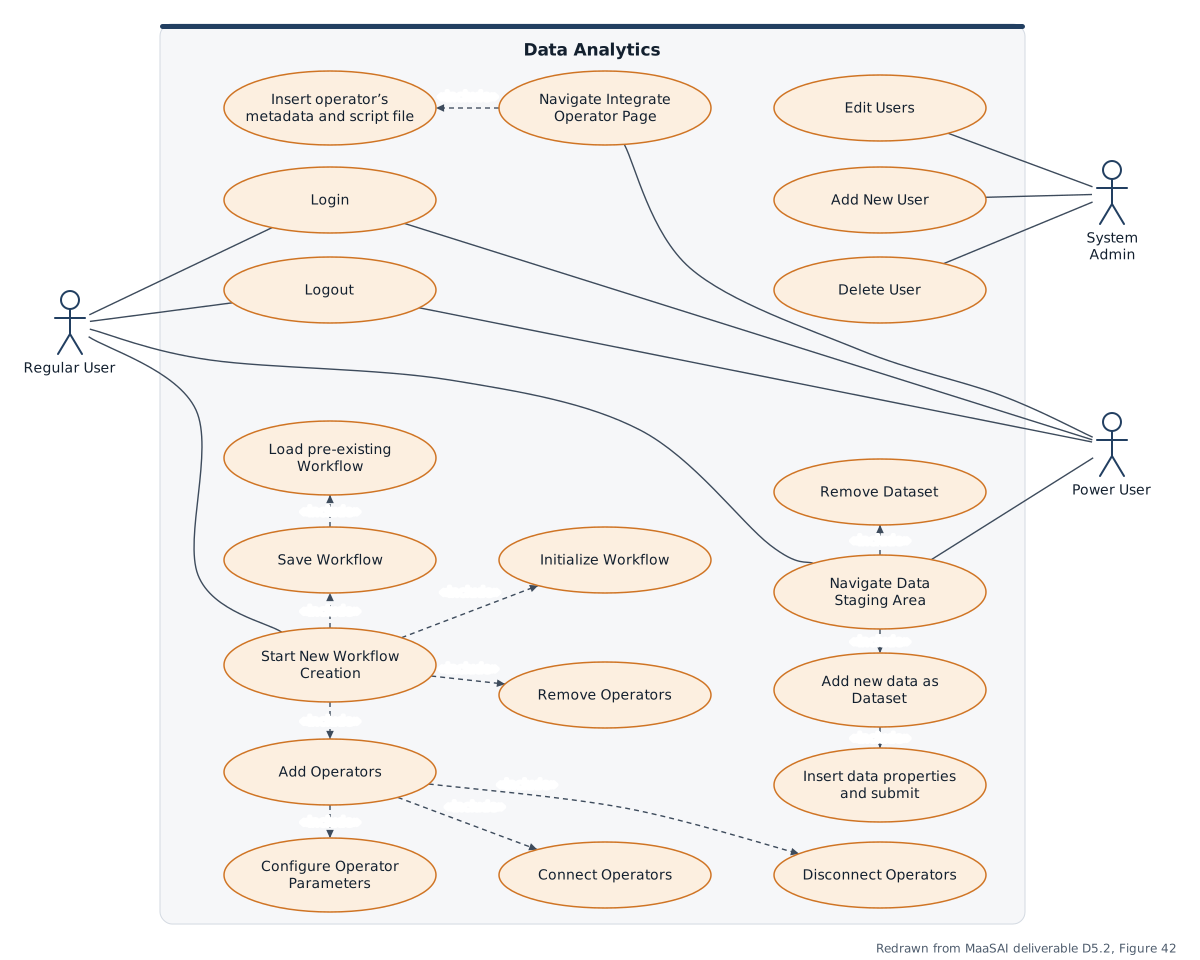
Use-case diagram redrawn from MaaSAI deliverable D5.2.
Functional Components
Section titled “Functional Components”DA combines workflow design, orchestration, dataset handling, operator execution, and result management so analytics can be built without low-level coding. The functional view shows how user-defined pipelines move through execution and storage services before producing analytical outputs and reusable models.
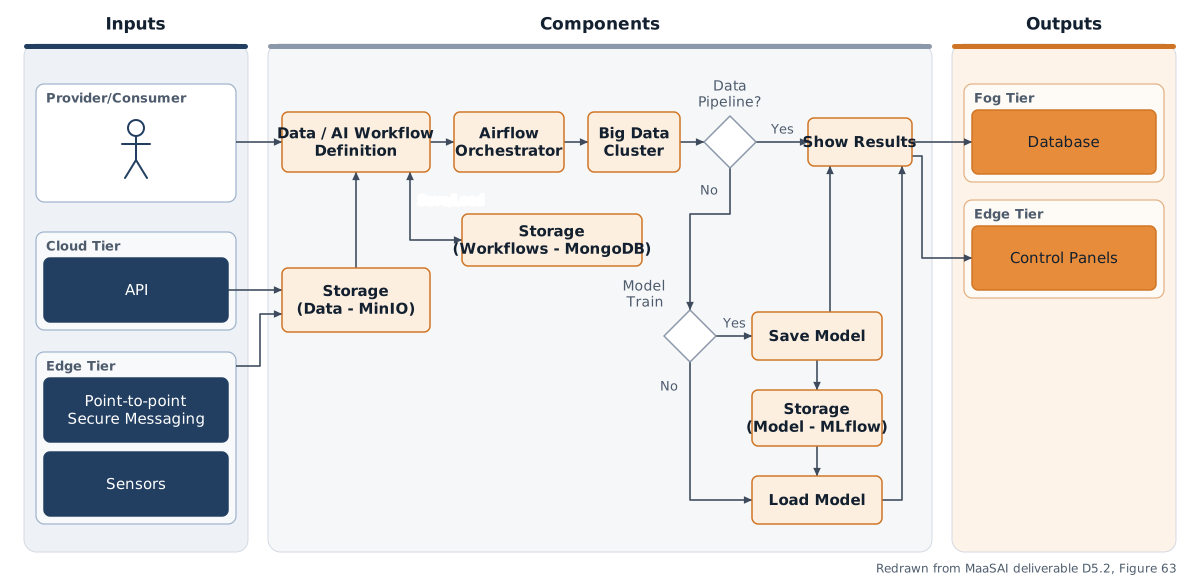
Functional components diagram redrawn from MaaSAI deliverable D5.2.
Design Baseline
Section titled “Design Baseline”The DA solution is organised around a small number of clearly separated building blocks. The frontend provides a visual environment for creating and running workflows, while the backend coordinates execution and communication between services.
Storage keeps workflow definitions, execution logs, results, and trained models, and the workflow orchestrator schedules and supervises analytical pipelines over time.
Behind those user-facing parts, the broader technology stack supplies the actual analytics capabilities, including data-processing, machine-learning, and deployment-oriented services.
The overall architecture follows a modular, container-based pattern so the platform can scale, evolve, and integrate additional operators without redesigning the whole solution.
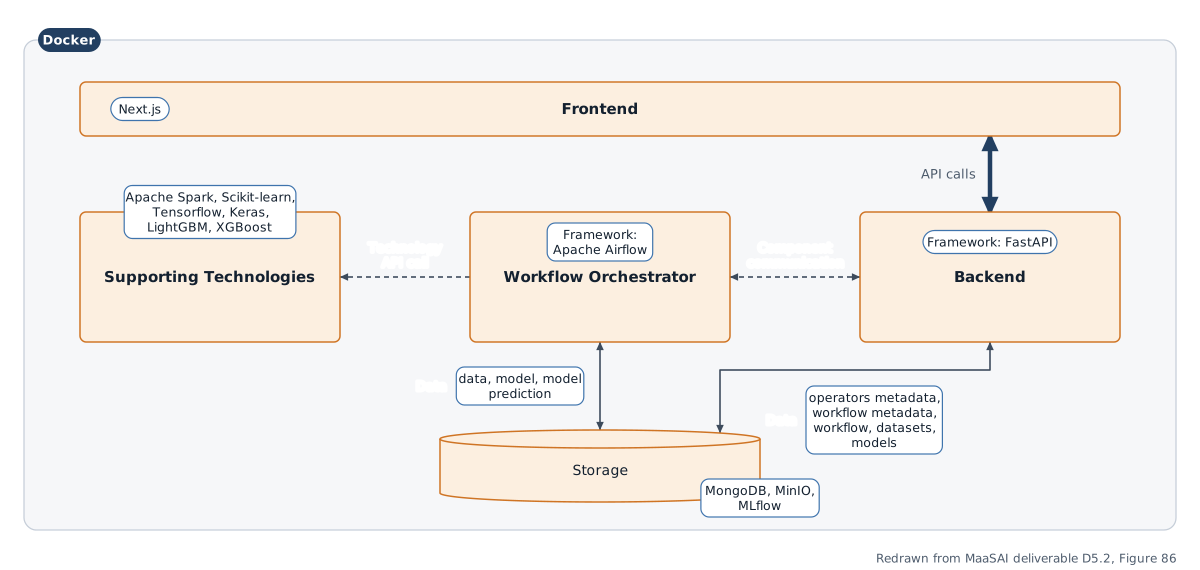
Architecture diagram redrawn from MaaSAI deliverable D5.2.
Technology Stack
Section titled “Technology Stack”DA combines a Python/JavaScript web application with a set of big-data and MLOps platform services.
| Category | Technology |
|---|---|
| Backend | Python 3.10, FastAPI + Uvicorn |
| Frontend | Next.js 14 (React 18), JavaScript (ES2023) |
| Data & storage | MongoDB 7.0 (intermediary and metadata storage), MinIO (object storage for datasets and execution results), MLflow 3.3 (AI/ML model storage and deployment) |
| Processing & orchestration | Apache Airflow 3.0 (workflow orchestration), Apache Spark 3.5 (data-analytics computing framework) |
| Security | Keycloak 25 (authentication and authorisation) |
| Containerisation | Docker and Docker Compose |
| Licence | no licence file is currently included in the repository |
Integrations & External Dependencies
Section titled “Integrations & External Dependencies”Within the MaaSAI architecture, DA sits at the data preparation and insight extraction layer, acting as a bridge between raw industrial data and the analytical and AI-driven capabilities that other MaaSAI solutions depend on. Its required external dependencies are the platform services it orchestrates: Apache Airflow for workflow scheduling and execution, Apache Spark for data processing, MongoDB for workflow and operator metadata, MinIO for datasets and permanent execution results, and MLflow for models and model-related artefacts. Supporting analytics technologies include pandas, Keras, and Scikit-learn.
APIs & Interfaces
Section titled “APIs & Interfaces”The backend exposes a REST API over HTTP (port 8000), self-documented via a /docs endpoint.
/workflows— CRUD for workflows and workflow metadata/operators— retrieve and add operator (task) definitions/airflow— fetch execution information, create and delete executions/dataset— access, create, and delete datasets/mongodb— access and delete MongoDB collections/models— access trained models and associated information/cron— timestamp-to-cron conversion
The web UI (Next.js/React) offers four main areas: the Dataset Staging Environment, the drag-and-drop Workflow Creation Workspace, the Execution Environment for monitoring and manual runs, and the Model Management page for comparing training runs, metrics, and artefacts.
User Interface
Section titled “User Interface”Representative screens of the DA web interface in the first release:
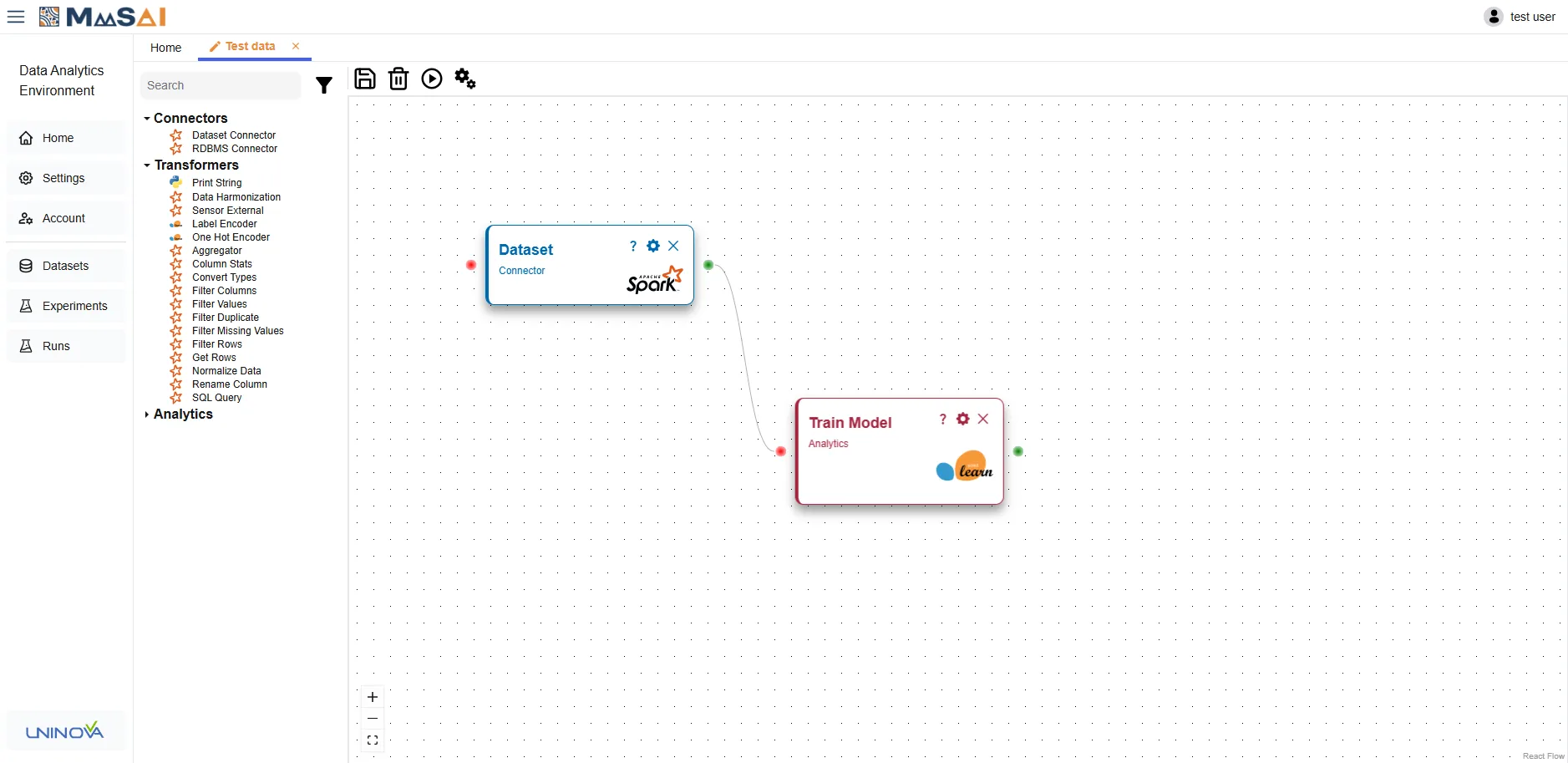
Workflow creation workspace — MaaSAI deliverable D10.1.
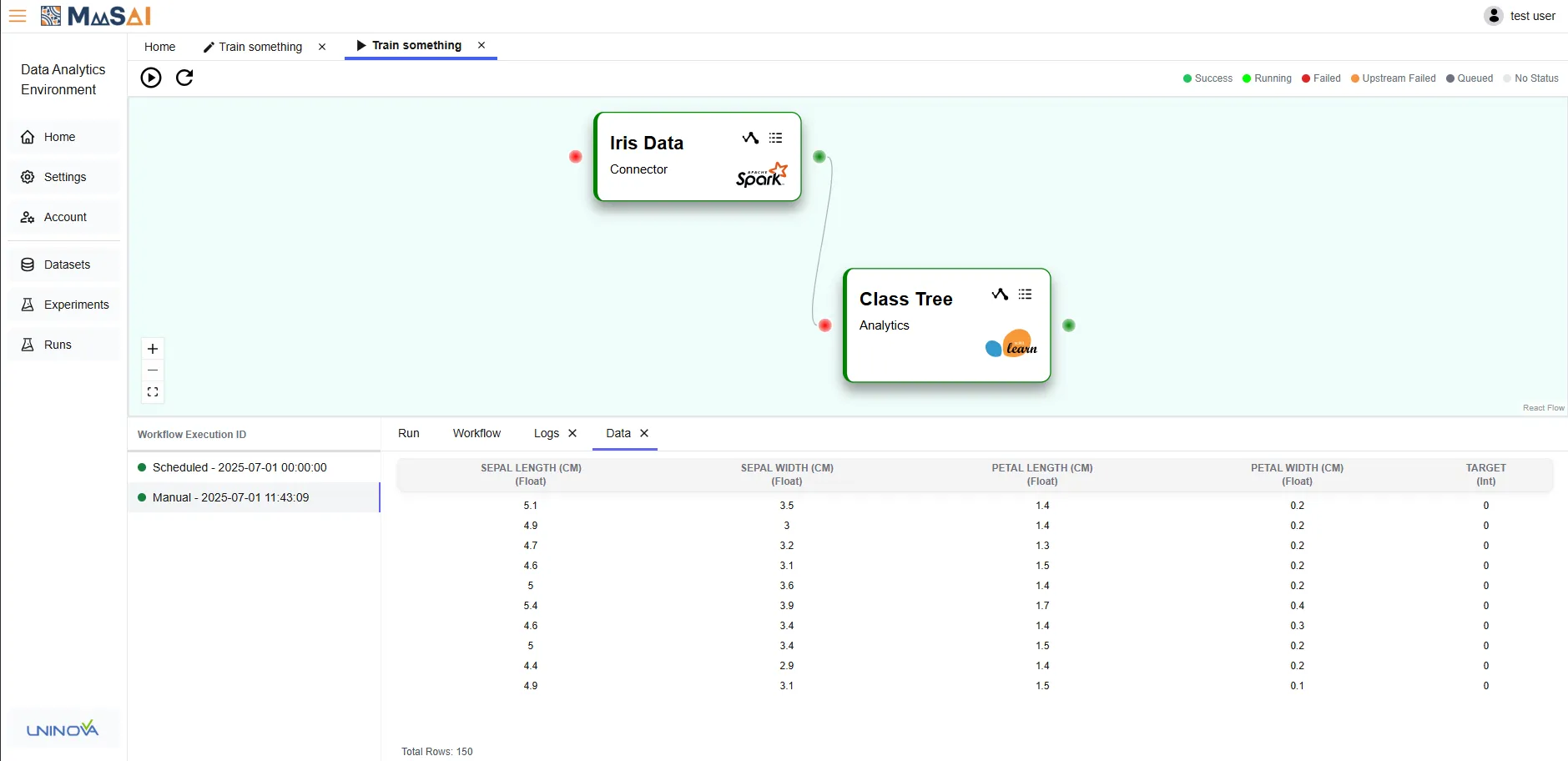
Execution environment — MaaSAI deliverable D10.1.
Deployment & Configuration
Section titled “Deployment & Configuration”DA is launched with a single Docker Compose command using one production/development profile; Airflow and Spark images are built via a makefile or manually, and a partial initialisation without Airflow and Spark is available for development.
| Requirement | Minimum | Recommended |
|---|---|---|
| CPU | 8 CPUs | 12 CPUs |
| RAM | 16 GB | 32 GB |
| Storage | 15 GB | 30 GB |
Configuration is handled through environment variables in .env files or Compose definitions, covering MongoDB, Keycloak realm and client settings, Spark master URL, Airflow hosts and API path, backend/frontend hosts and ports, and MLflow and MinIO endpoints and credentials.