
Digital Industrial Passport Designer (DIP)
At a Glance
Section titled “At a Glance”
- Category: Data & Infrastructure
- Primary environment: MaaS Provider
- Documentation focus: Design reference
- Maturity: TRL 4 (first release, reported in D8.1 at M20; MaaSAI System 1st Release planned for M24)
- Related architecture docs: Reference Architecture Guide, Environments
Purpose
Section titled “Purpose”The Digital Industrial Passport Designer (DIP) is a central data management platform that creates and maintains digital passports for manufacturing assets. Its architecture is based on several key implementation components designed for modularity and scalability. The primary components are:
Primary Actors
Section titled “Primary Actors”The D5.2 usage viewpoint defines roles, permissions, constraints, a role-task matrix, and a use case diagram for this solution.
- User (Decision-maker): Explore and utilize passport information for analysis, predictive maintenance, and strategic planning. Query for specific passport data.; constraint: Must be an authenticated and authorized user to access potentially sensitive passport data.
- Data Sources (System): Provide diverse, new, and updated data to the DIP. Data includes ML outputs, xAI insights, RS data, sensor readings, and files; constraint: Data formats must be compatible with the DIP’s ingestion service.
- MaaS Ontology (System): Provide harmonized data structure definitions to ensure interoperability.; constraint: Must be available and responsive for the DIP to perform data harmonization.
- Other MaaSAI Solutions (System): Provide contextual data from other system parts (e.g., Analytics, Planning) to the DIP. Query the DIP for specific or harmonized passport data to support their own functions.; constraint: API calls must adhere to the defined specifications.
- Digital Industrial Passport Designer (DIP): Gather, manage, update, and archive data from all sources. Harmonize incoming data using the MaaS Ontology. Create and maintain a centralized passport repository. Present a comprehensive and unified view to users. Ensure data governance and security.; constraint: Must ensure the integrity, security, and real-time availability of the Digital Industrial Passport.
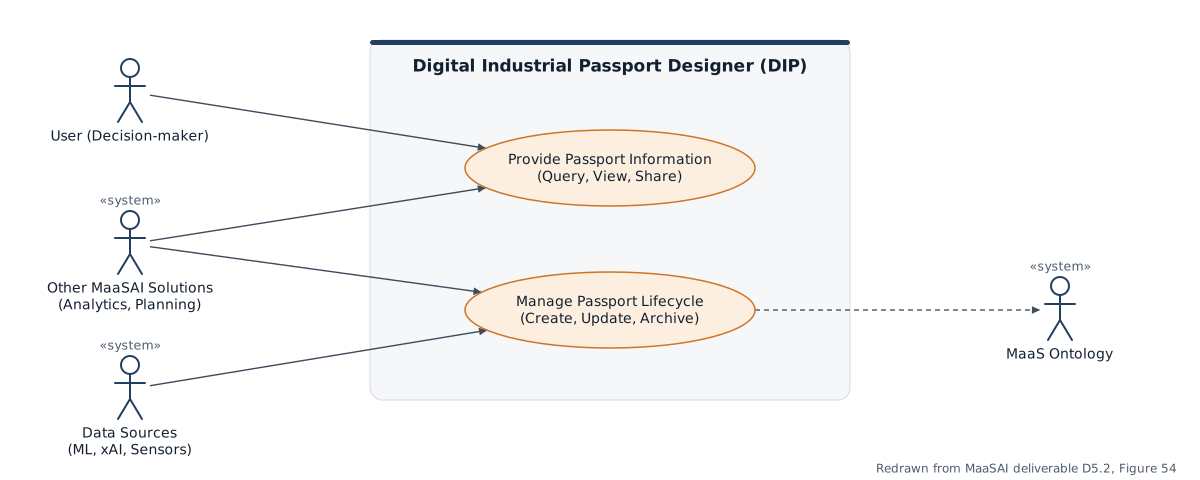
Use-case diagram redrawn from MaaSAI deliverable D5.2.
Functional Components
Section titled “Functional Components”DIP combines ingestion, harmonisation, ontology alignment, repository management, and query services to build digital industrial passports. The functional view shows how business data, sensor data, and outputs from other MaaSAI services are normalised and assembled into passport records.
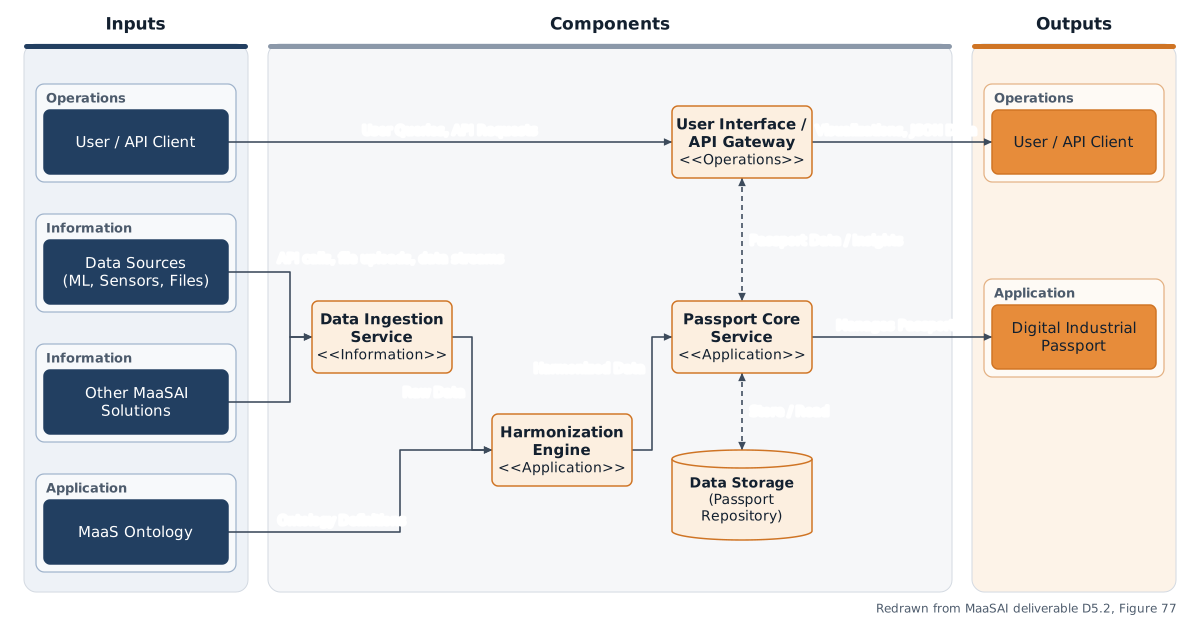
Functional components diagram redrawn from MaaSAI deliverable D5.2.
Design Baseline
Section titled “Design Baseline”• DIP Service Backend is the core component that orchestrates all DIP functionalities. It exposes an API for data interaction and contains the main business logic. It’s deployed as a containerized microservice using Docker. It connects to other MaaSAI solutions and data sources via a REST API to ingest data. Internally, it connects to the MaaS Ontology for data harmonization and to the Passport Repository for storage. This component is stateless, delegating the management of persistent data to the Passport Repository.
• Data Ingestion & Harmonization Engine is typically part of the backend service, is responsible for processing incoming data. Deployed as part of the main containerized backend service. It receives data from the backend’s API endpoints and connects to the MaaS Ontology to retrieve data structure definitions for harmonization. It is a stateless processing unit.
• Passport Repository is the persistent storage layer for the Digital Industrial Passports. Deployed as a managed database service, either in the cloud or on-premise, depending on the pilot’s infrastructure. It’s accessed by the DIP Service Backend through a database connector. This component is inherently stateful, as it is the system’s central repository.
The workflow begins with data ingestion from two primary external sources. First, high-level business or production data, such as work orders or material lists, is sent from the ERP/MES to the Data Ingestion Microservice, typically as HTTP messages in XML or JSON format. Second, real-time operational data like sensor readings, machine status, or log files is streamed as JSON messages from Data Sources to the same Data Ingestion Microservice. This microservice, which could be a Node-Red instance, acts as the single entry point. Its job is to receive this raw, unstandardized data and publish it to the Message Broker using the MQTT protocol.
The Message Broker, such as Mosquitto, acts as a central communication bus. This architecture decouples the ingestion of data from the processing of data. The Ingestion service simply publishes data to specific topics (e.g., data/raw/erp or data/raw/sensors) without needing to know which service will consume it, which makes the architecture resilient and scalable.
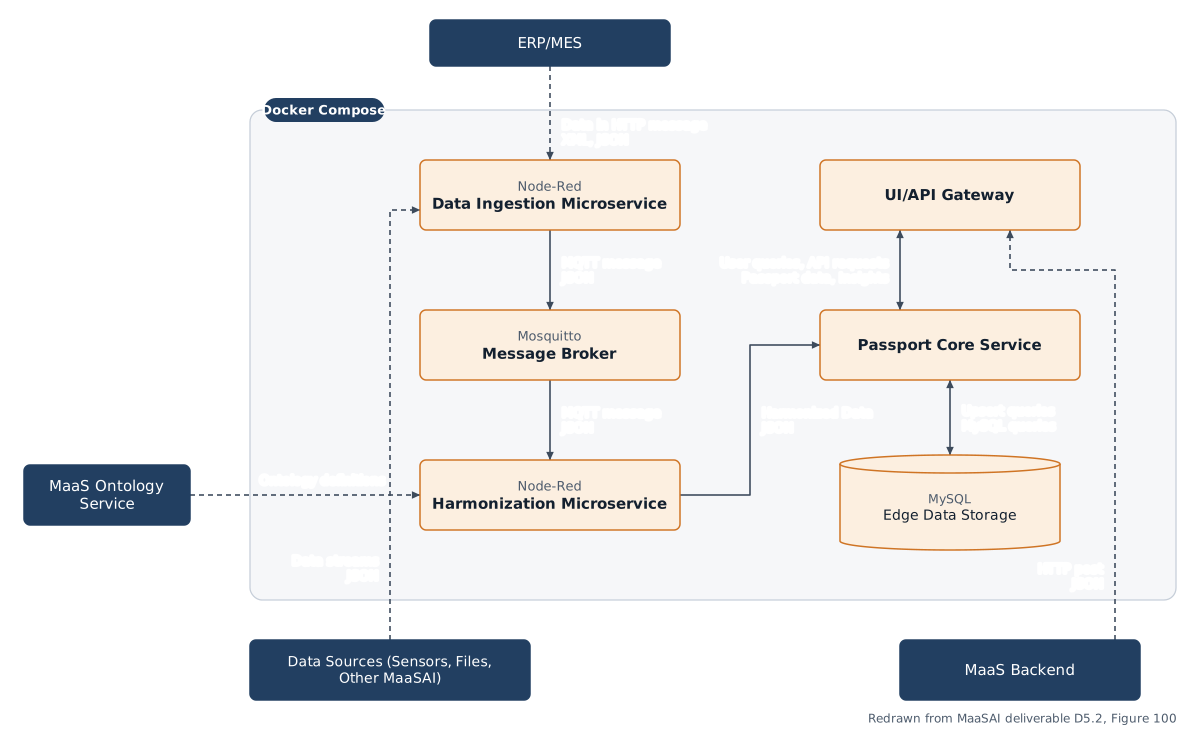
Architecture diagram redrawn from MaaSAI deliverable D5.2.
Technology Stack
Section titled “Technology Stack”The DIP Designer is built as a full-stack web application with an automation layer for passport provisioning.
| Category | Technology |
|---|---|
| Backend | Node.js with Express.js, managing server logic, routing and directory orchestration. |
| Frontend | Handlebars (hbs) view engine rendering the step-by-step configuration wizard. |
| Data | PostgreSQL, storing and tracking asset passport blueprints. |
| Automation | a custom builder engine running background shell processes that deploy the standalone passport instances. |
| Containerisation | Docker and docker-compose for the designer application and its database. |
| Licence | proprietary / closed source within the MaaSAI consortium, with open-source dependencies under their standard permissive licences. |
Integrations & External Dependencies
Section titled “Integrations & External Dependencies”Within the MaaS Provider Suite, the MaaS Provider Agent (MPA) feeds the DIP Designer the raw asset information and instructions needed to start the passport configuration process. The EDGE Data Storage (DS) is designed as a direct bidirectional connection used to look up existing assets, handle correlations and log generated blueprints; both components share a PostgreSQL relational foundation to ease data mapping in subsequent integration phases. External dependencies are a PostgreSQL server for persistence and a Docker environment for the background deployment engine.
APIs & Interfaces
Section titled “APIs & Interfaces”GET /api/blueprints— retrieves all saved passport blueprints, ordered alphabetically by name.POST /api/publish— the bridge endpoint: receives the configuration, saves it as a timestamped JSON blueprint, records it in PostgreSQL and triggers the automated deployment engine.- The UI comprises a landing/management dashboard and an eight-step wizard covering metadata, data sources, visualisation modules, layout templates and theming, entity schemas, DPP correlations, deployment networking, and a final preview with JSON blueprint generation.
- The designer client is anchored to port 3000, while each generated DPP is bound to the custom IP address and port set by the operator.
User Interface
Section titled “User Interface”Representative screens of the DIP designer in the first release:
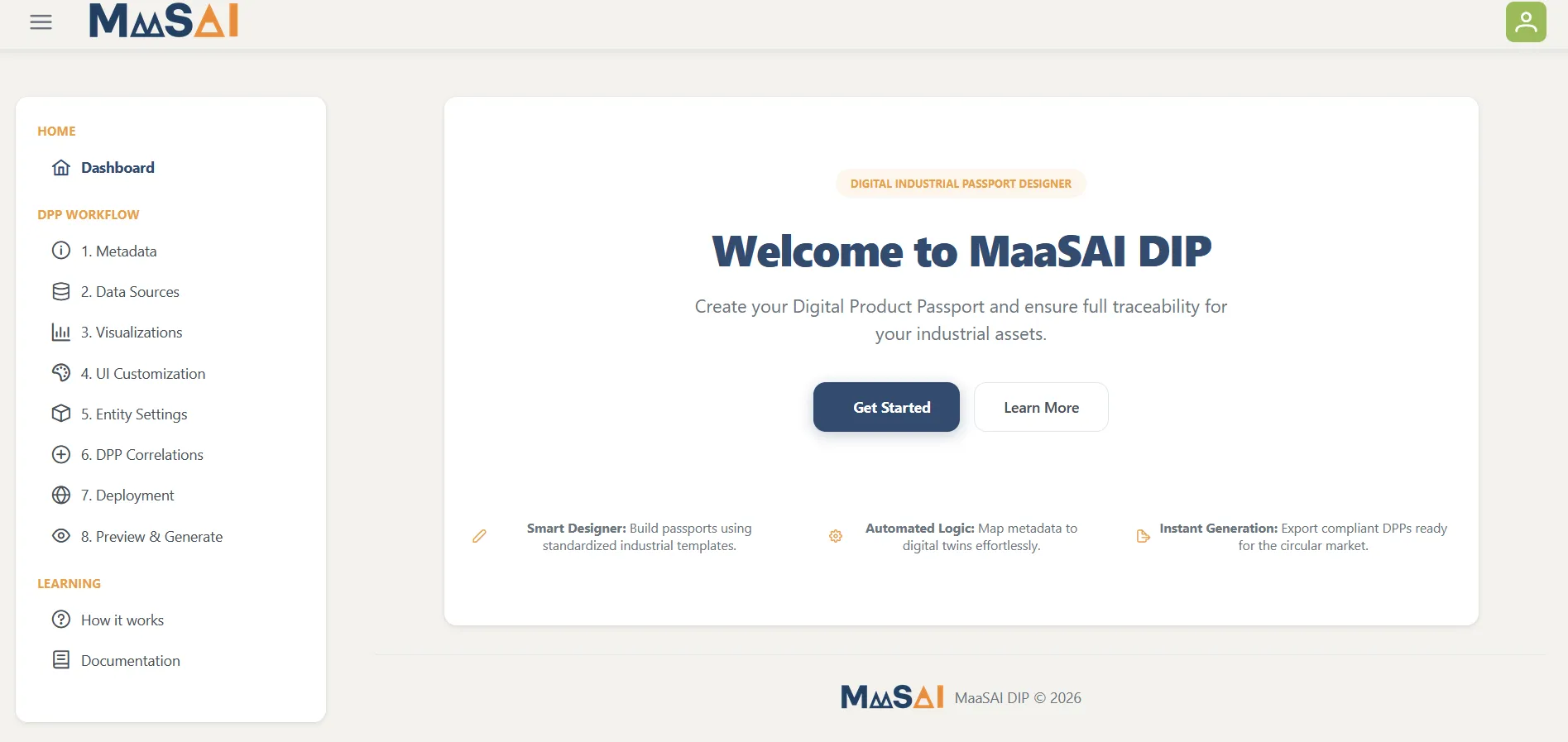
DIP landing page and passport management dashboard — MaaSAI deliverable D8.1.
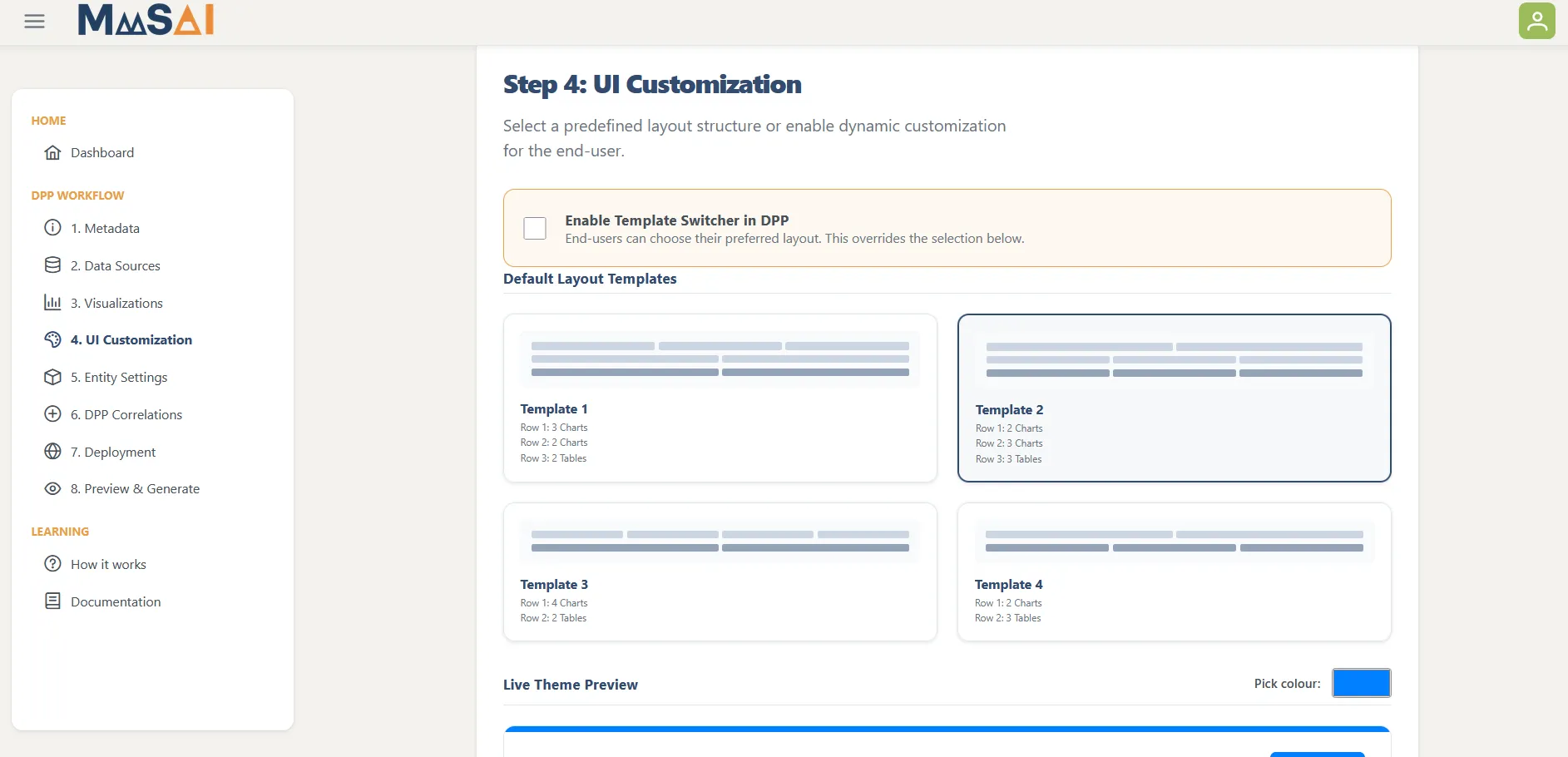
Configuration wizard — UI customisation stage — MaaSAI deliverable D8.1.
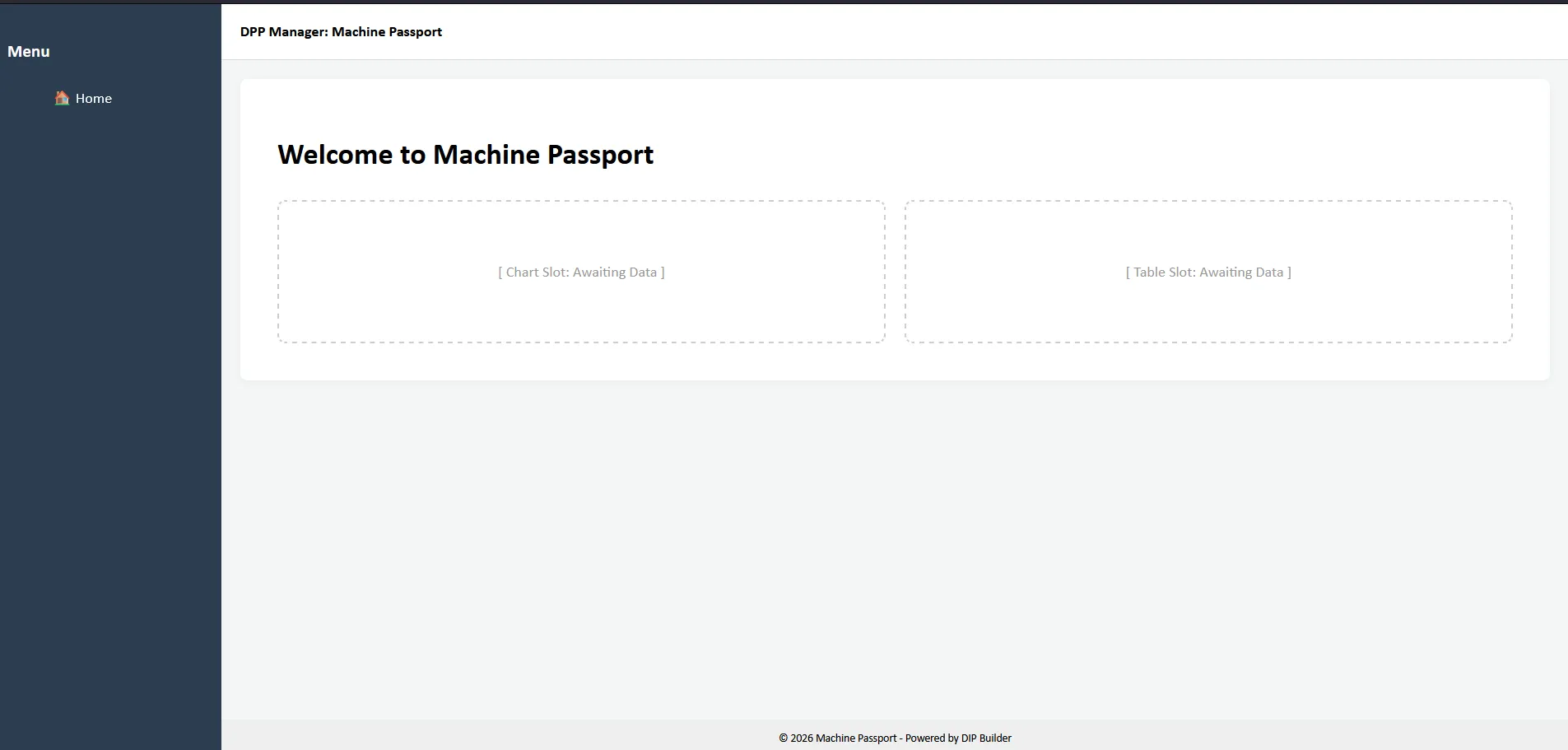
Live Machine Passport application page after deployment — MaaSAI deliverable D8.1.
Deployment & Configuration
Section titled “Deployment & Configuration”The platform is lightweight and platform-agnostic: it runs on any desktop, on-premises server or cloud environment that supports the Node.js runtime and a Docker Engine daemon (Linux, Windows 10/11 via WSL2, macOS), with resource use scaling with the number of deployed passport containers. Deployment uses a docker-compose stack (designer application plus PostgreSQL), persistent mounts for the /exports and /deployments directories, and a root .env file defining PORT (optional) and the required DB_HOST, DB_PORT, DB_USER, DB_PASSWORD and DB_NAME parameters. The management dashboard becomes available at http://[host-ip]:3000/main.