
Digital Twins Designer (DTD)
At a Glance
Section titled “At a Glance”
- Category: Planning, Design & Assessment
- Primary environment: MaaS Provider
- Documentation focus: Design reference
- Maturity: TRL 4–5 (first release, reported in D10.1 at M20; MaaSAI System 1st Release planned for M24)
- Related architecture docs: Reference Architecture Guide, Environments
Purpose
Section titled “Purpose”The Digital Twins Designer (DTD) lets a MaaS Provider build digital twins of its manufacturing assets, compose them into production lines, monitor them with metrics, and plan production on top of those lines. Each asset is kept synchronised with live shop-floor data, so the metrics and plans always work on the current state of the plant.
The solution follows a four-step workflow:
- Assets come first.
- Production lines are built from them.
- Metrics can then be defined on a single asset or on a whole line.
- Planning: finally, a production plan is created from a line.
Primary Actors
Section titled “Primary Actors”The roles below are based on the D5.2 usage viewpoint.
- Asset designer: Defines asset types and their instances, with their parameters and the shop-floor signals they report, and saves them in the assets collection of the database; constraint: Can only define new assets
- Manufacturing line designer: Defines new production lines from previously defined assets and saves them in the production lines database; constraint: Can only define new production lines and read the previously defined assets
- Digital Twin Designer: Defines assets, production lines, metrics and production plans; constraint: Cannot manage users and users’ permissions
Functional Components
Section titled “Functional Components”DTD is organised in four functional steps. Shop-floor data enters through the assets: each asset feature is linked to an MQTT topic and receives its live values from it.
- Asset definition. An asset type describes a family of equipment: category, shared planning attributes (batch size, cycle time, power, storage limits) and the schema of the real-time features every instance reports (name and units). An asset instance is one physical machine of that type. It can override the attributes of its type and links each feature to an MQTT topic. Every asset is mirrored as a Thing in Eclipse Ditto.
- Production line definition. A visual canvas (Line Designer) connects assets by drag and drop to describe the material flow between stages. A line references assets by their unique name, and each asset appears at most once per line.
- Metrics definition. A metric is a formula (
+ - * / ( )) over typed variables: a real-time feature, a static attribute or a constant. It can be defined on a single asset or on a whole production line, has a unit, and can have thresholds that set its status (critical, warning, good, excellent). Metrics are recalculated automatically when the asset features they use receive new values. Their values are stored in the PostgreSQL DB and shown in the web UI. - Planning. A production plan is created from a production line. The planner schedules production over that line using the planning attributes of its assets, under a chosen scheduling strategy (as soon as possible, as late as possible, inventory buffer, or energy cap) and the user’s constraints. Results are shown in an interactive Gantt chart with total time, cost, energy and throughput indicators, and plans can be saved, copied, exported and imported.
Shop-floor data never feeds metrics or plans directly: it updates the features of the assets over MQTT, and metrics and plans work on those assets.
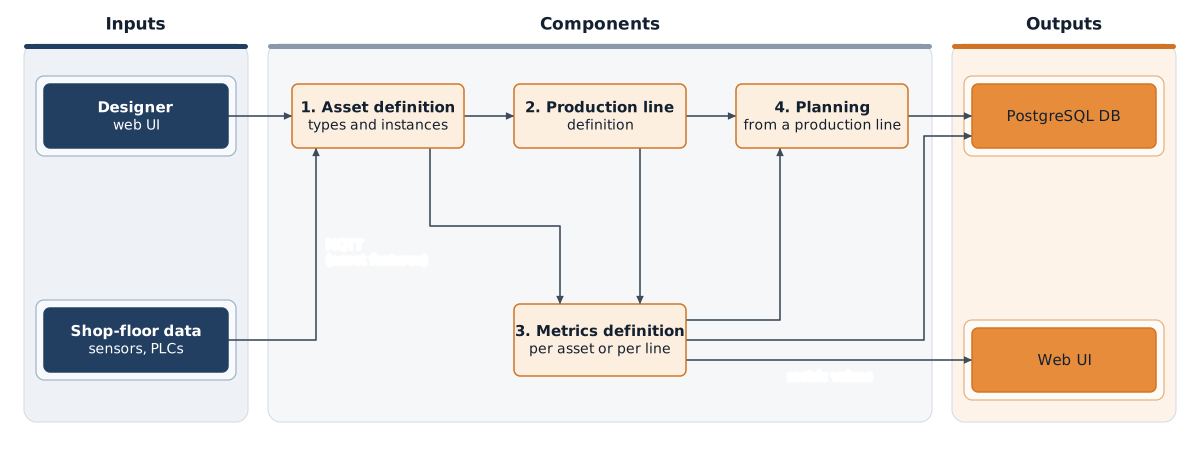
Functional view of DTD: from asset definition to production planning.
Design Baseline
Section titled “Design Baseline”The architecture described here is the one defined by the production deployment profile. The whole solution is containerised and runs as a single Docker Compose stack, while identity management and the PostgreSQL DB are external services that DTD connects to rather than containers it deploys.
Users reach DTD from a web browser through the Module User Interface, a stateless Next.js application that is the provider’s main entry point. It groups the four modules of the solution (Production Assets, Production Lines, Metrics and Planning) and a visualisation layer with the canvas-based Line Designer, live charts and the interactive Gantt view. The interface sends customization parameters and configuration to the backend over REST and receives live feature and metric updates through a WebSocket (/ws). Login is delegated to the UPV Keycloak (login.maasai-srv.cigip.upv.es, realm MAASAI), so DTD does not deploy its own identity provider.
Behind the interface, a FastAPI backend implements one functional module per step of the workflow. The manufacturing assets definition module manages asset types and instances and keeps every asset synchronised with its Thing in Eclipse Ditto. The production lines definition module stores the lines built from those assets. The metrics definition and calculation module evaluates each metric formula and recalculates it whenever the asset features it uses receive new values, listening to Ditto’s server-sent event stream and pushing the results to the interface. The planning module creates and stores production plans from a production line. All modules validate the user’s token offline against the public keys (JWKS) of the UPV Keycloak realm.
Shop-floor data enters the solution through the assets. Eclipse Mosquitto receives telemetry from sensors and PLCs over MQTT, and Apache NiFi, reached through an Nginx TLS proxy, resolves which asset and feature each topic belongs to. NiFi updates that feature in the digital twin state, held by Eclipse Ditto (gateway plus policies, things, things-search and connectivity services, behind an Nginx reverse proxy, with MongoDB 4.4 as its internal store), writes the new value and the measurement history to the application database, and notifies the backend so that the interface and the affected metrics are refreshed.
The DB Solution is a local PostgreSQL 16 instance that holds the DTD data model (asset types and instances, production lines, metrics and plans) and the timeseries_data table with the history of every feature and metric. Every write to this database, including metric values, is also stored in the PostgreSQL DB through its PostgREST API, which makes DTD data available to the rest of the MaaSAI solutions. This copy is best-effort: if PostgREST is unreachable the failure is logged and the local database remains the source of truth. pgAdmin, Mongo Express and the Ditto UI are deployed alongside for operation and troubleshooting.
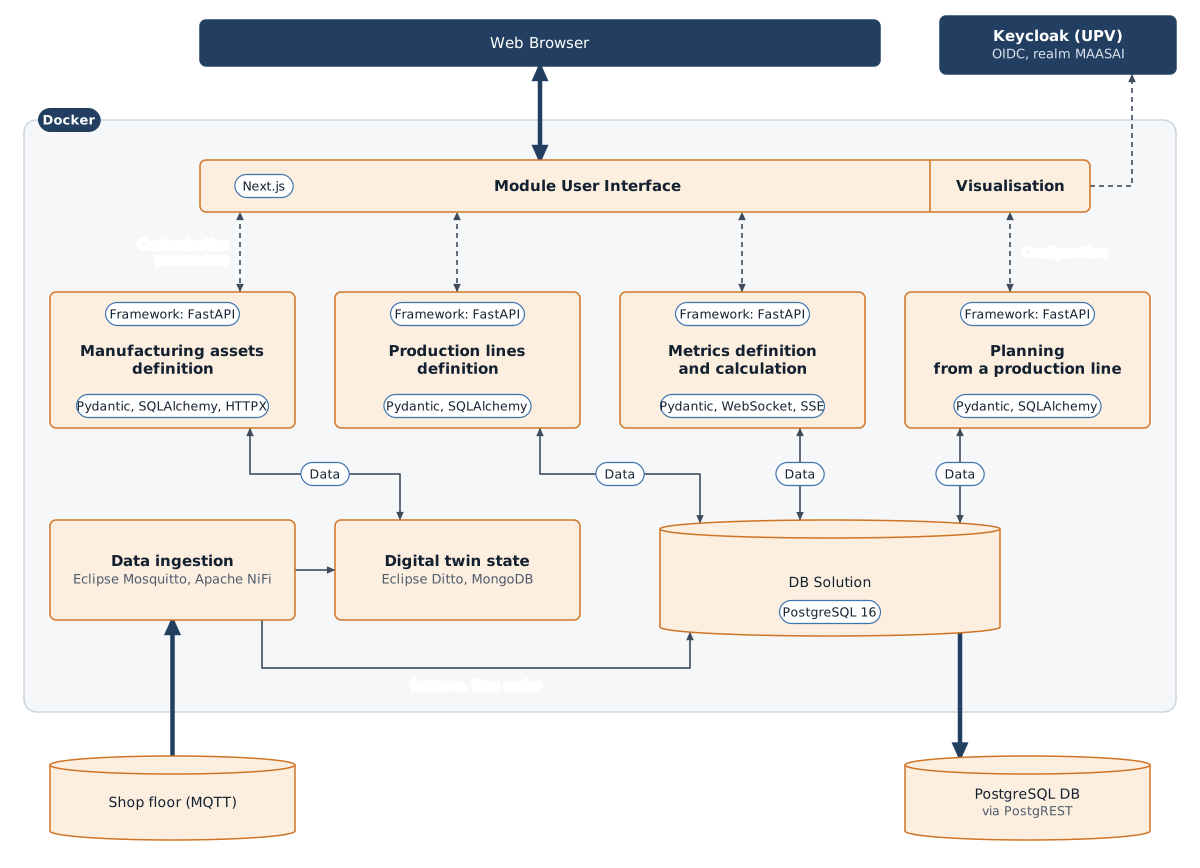
Production deployment architecture of DTD.
Real-time data flow
Section titled “Real-time data flow”Two paths carry live data to the web UI:
- Telemetry ingestion. Sensors and PLCs publish their readings to Mosquitto (MQTT), and Apache NiFi takes
them from the broker. NiFi then patches the feature in Ditto, updates the asset feature in PostgreSQL,
inserts the measurement in
timeseries_dataand notifies the backend, which pushes the update to the web UI over WebSocket. - Metric recalculation. Ditto events reach the backend as server-sent events (SSE). The backend recalculates the metrics and pushes the results to the web UI over WebSocket.
The web UI offers two ways to see data. Play opens the WebSocket and receives updates as they arrive, without polling. Refresh reloads current values and history through a one-off REST request. The frontend never connects to the MQTT broker directly.
Technology Stack
Section titled “Technology Stack”| Category | Technology |
|---|---|
| Backend | Python 3.12 with FastAPI + Uvicorn, Pydantic for data validation, SQLAlchemy/asyncpg for database access, HTTPX as HTTP client (Ditto and PostgREST), PyJWT for token validation |
| Frontend | Next.js 14 (React 18, Pages Router) with PrimeReact, Radix UI and Tailwind CSS; Chart.js and Recharts for charting; keycloak-js for authentication |
| Data | PostgreSQL 16 as application and time-series database; PostgreSQL DB reached through PostgREST; MongoDB 4.4 as Eclipse Ditto’s internal store |
| Digital twin & messaging | Eclipse Ditto (twin state management), Eclipse Mosquitto 2.0 (MQTT broker), Apache NiFi 2.0 (data integration) |
| Platform services | Nginx reverse proxies (Ditto and NiFi); UPV Keycloak for identity management (external) |
| Containerisation | Docker / Docker Compose |
| Licence | no licence file is included in the repository; the component is developed as proprietary software within the MaaSAI research project |
Integrations & External Dependencies
Section titled “Integrations & External Dependencies”Within the WP10 high-level architecture, DTD sits at the fog layer, receiving telemetry from industrial sensors and PLCs at the edge over MQTT.
- Shop floor (edge): devices publish to the Mosquitto broker. Each asset feature is linked to an MQTT topic, and NiFi uses that link to route each message to the right asset.
- PostgreSQL DB: DTD data is stored in the PostgreSQL DB through its PostgREST REST API, so other solutions can consume assets, lines, metrics, plans and time series without calling DTD directly.
- UPV Keycloak: single sign-on for all MaaSAI users, shared with the other solutions of the project.
Third-party components deployed with DTD are Eclipse Ditto, PostgreSQL, Eclipse Mosquitto, MongoDB, Apache NiFi and Nginx.
APIs & Interfaces
Section titled “APIs & Interfaces”The backend exposes a REST API over HTTP on port 8000, with interactive documentation at /docs (Swagger) and /redoc. All /api routes require a valid Keycloak token when authentication is enabled.
- Assets:
/api/asset_types/and/api/asset_instances/(CRUD of types and instances);/api/assets/for the combined asset view, with live state from Ditto (/state/all,/state/{name}) and line dependencies (/{name}/used-in-lines) - Production lines:
/api/lines/(CRUD of nodes and connections) - Metrics:
/api/metrics/for metric definition, current values (/value,/values/all) and recalculation (/recalculate-all,/recalculate-for-asset) - Planning:
/api/planning/for the CRUD of saved production plans - History:
/api/timeseries/history/{thing_id}/{feature_id}and/stats/...for feature history and statistics (1 hour to 7 days),/api/timeseries/metric/history/{metric_id}for metric history - Events:
/api/events/features, used by NiFi to notify new feature values - Configuration:
/api/config/connectionsto view, update and test the connection settings of external services (such as Keycloak) at runtime - Real time: WebSocket
/ws, where clientssubscribe/unsubscribeto a feature (thing_id,feature_id) or a metric (metric_id) - Operations:
/healthfor health checks;/debug/monitorand/debug/wsfor the state of the Ditto event monitor and active WebSocket connections
Errors are returned as {"detail": "..."}, with 409 for duplicate names and 422 for validation errors. Assets, lines and plans can also be exported and imported as JSON from the web UI.
User Interface
Section titled “User Interface”Representative screens of the DTD web interface in the first release:
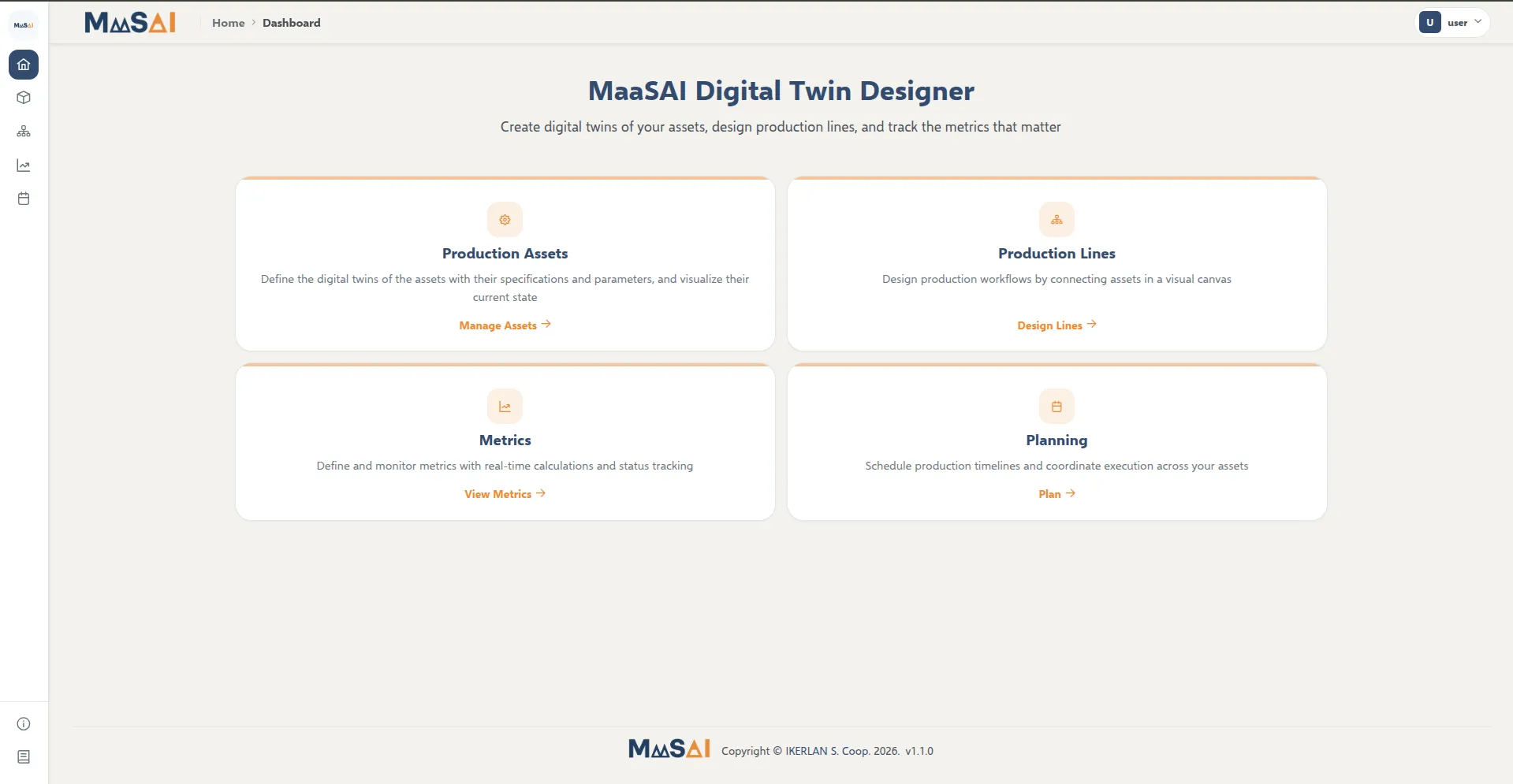
Home page of the Digital Twins Designer with the four modules, MaaSAI deliverable D10.1.
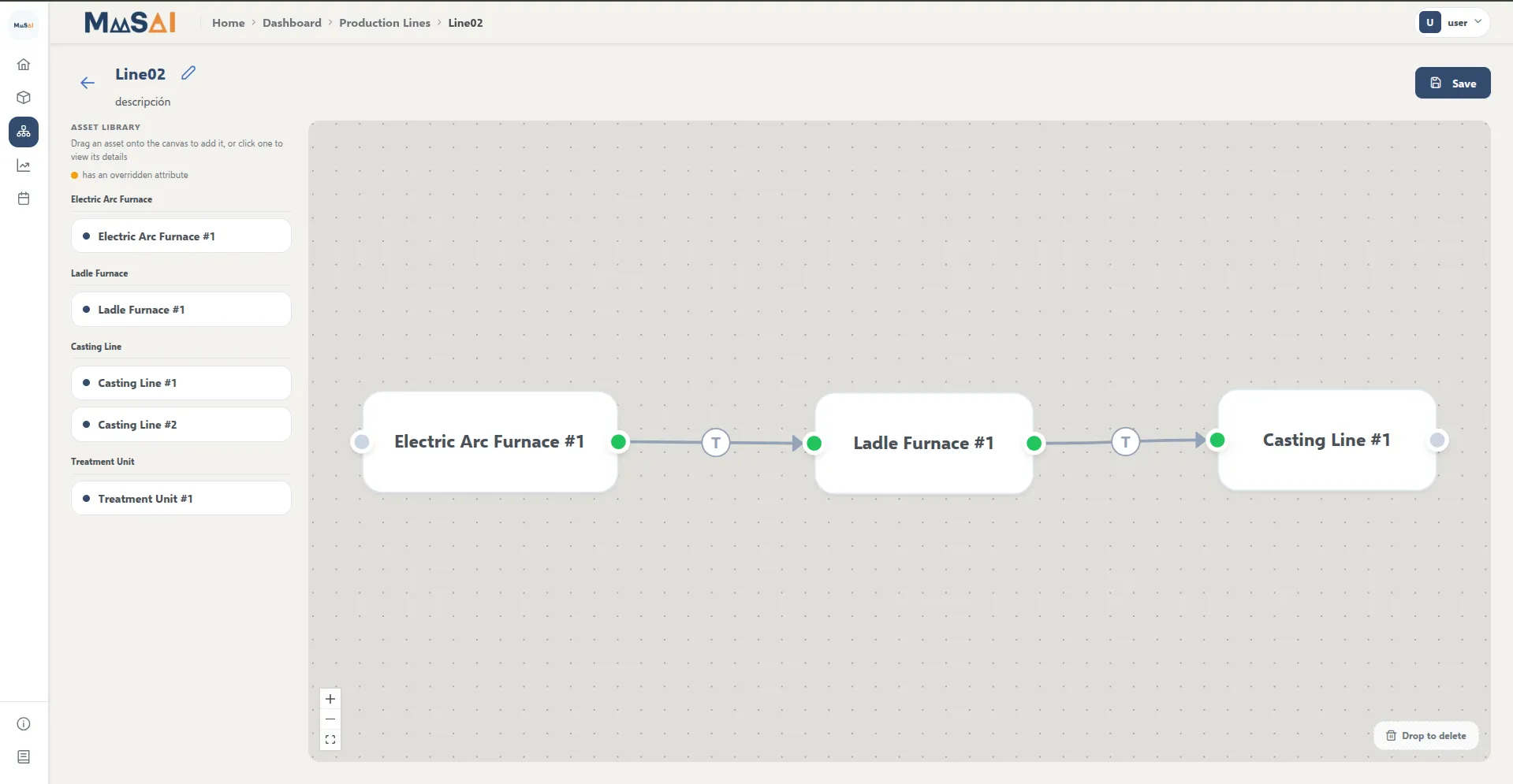
Production line visual designer, MaaSAI deliverable D10.1.
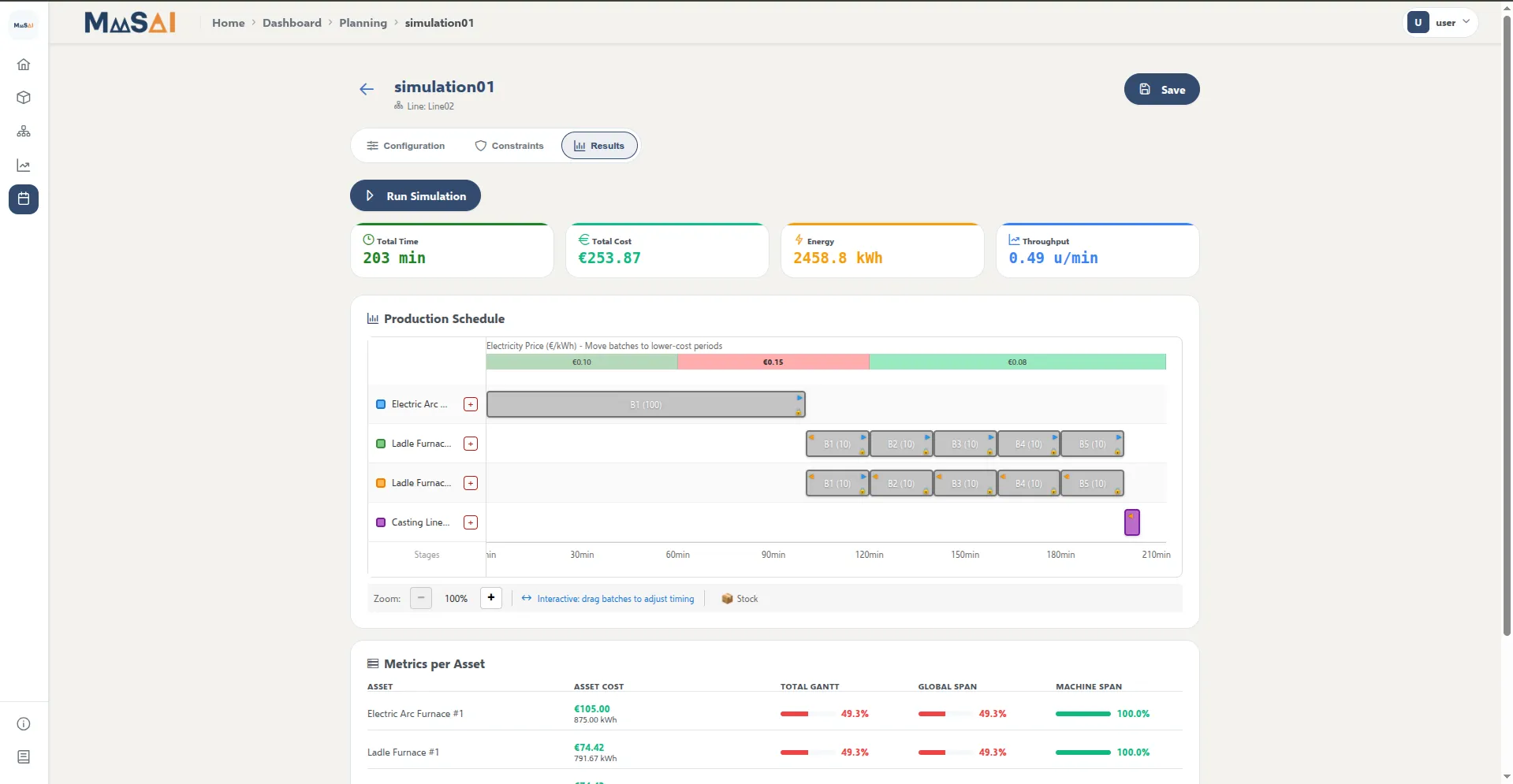
Planning results with the production schedule and per-asset indicators, MaaSAI deliverable D10.1.
Deployment & Configuration
Section titled “Deployment & Configuration”The whole platform starts with a single Docker Compose command using the production profile (orchestration/docker/prod/docker-compose.yml). Backend and frontend images are built from the repository during deployment. After the first start, the NiFi flow is created with orchestration/nifi/provision_nifi_flow.py.
Main configuration settings:
- Frontend (build time):
NEXT_PUBLIC_API_URL(public URL of the backend),NEXT_PUBLIC_AUTH_REQUIRED(login required,trueby default),KEYCLOAK_URL(UPV Keycloak by default) with its realm and client settings. These values are built into the frontend bundle, so changing them requires rebuilding the image. - Backend:
DATABASE_URL,DITTO_URLand credentials,DITTO_EVENT_MONITOR_ENABLED,CORS_ALLOWED_ORIGINS,KEYCLOAK_URL/KEYCLOAK_REALM/KEYCLOAK_CLIENT_ID,AUTH_ENABLED, andCENTRAL_DB_URL(PostgREST base URL of the PostgreSQL DB; empty disables the mirror). - NiFi flow:
MQTT_TOPIC_FILTER,DITTO_URL,BACKEND_URL, andCENTRAL_DB_URLto also send time series to the PostgreSQL DB.
| Requirement | Minimum | Recommended |
|---|---|---|
| CPU | 4 cores | 8+ cores |
| RAM | 8 GB | 16 GB (Ditto and NiFi are memory-intensive) |
| Storage | 10 GB | 50+ GB |
| OS | Any Docker-capable OS | Linux |
Recommended values target production deployments. Ports 3000 (frontend), 8000 (backend), 5432 (PostgreSQL), 1883 and 9001 (MQTT), 8081 (Ditto API), 8082 (Ditto UI), 8083 (pgAdmin), 8084 (Mongo Express) and 8443 (NiFi) must be available.