
MaaS Supply Chain Simulator (SCS)
At a Glance
Section titled “At a Glance”
- Category: Planning, Design & Assessment
- Primary environment: MaaS Consumer
- Documentation focus: Design reference
- Maturity: TRL 3 (first release, reported in D12.1 at M20; MaaSAI System 1st Release planned for M24)
- Related architecture docs: Reference Architecture Guide, Environments
Purpose
Section titled “Purpose”The Supply Chain Simulator (SCS) is a modular cloud-based component that enables different user profiles (such as system administrators, model builders, and shared contributors) to interact with a shared simulation environment for supply chain analysis and planning. The system supports activities including user management, library creation (both base and customised), model development, and simulation execution. The SCS supports fast, secure, and role-based interactions, enabling users to run simulations and analyse outcomes based on individually constructed or collaboratively shared models. All components are structured to support extensibility, traceability, and security.
Primary Actors
Section titled “Primary Actors”The D5.2 usage viewpoint defines roles, permissions, constraints, a role-task matrix, and a use case diagram for this solution.
- System Administrator: Manages the system and all its components, from the system itself to the users registered in it.
- Super Administrator: The Super Administrator is responsible for managing the entire solution functionalities, including creating, Editing, and deleting both base and custom libraries, building models, and Running simulations.; constraint: No functional constraints. Subject only to system-level integrity and security policies.
- User Administrator: The User Administrator is responsible for creating, Editing, and deleting custom libraries, building models, and Running simulations.; constraint: Cannot create, Edit, or delete base libraries. Cannot manage user accounts or assign roles.
- User: The User is responsible for creating, Editing, and deleting models, and Running simulations.; constraint: Cannot create, Edit, or delete libraries. Cannot manage user roles or access other users’ models.
- User Shared: The User is responsible for contributing to a specific portion of a shared model, with the ability to create, Edit, and delete only their own section. Shared simulations can be executed using the full model, but other users’ contributions remain hidden as black boxes.; constraint: Cannot access or modify sections of the shared model created by other users. Cannot manage libraries or user roles.
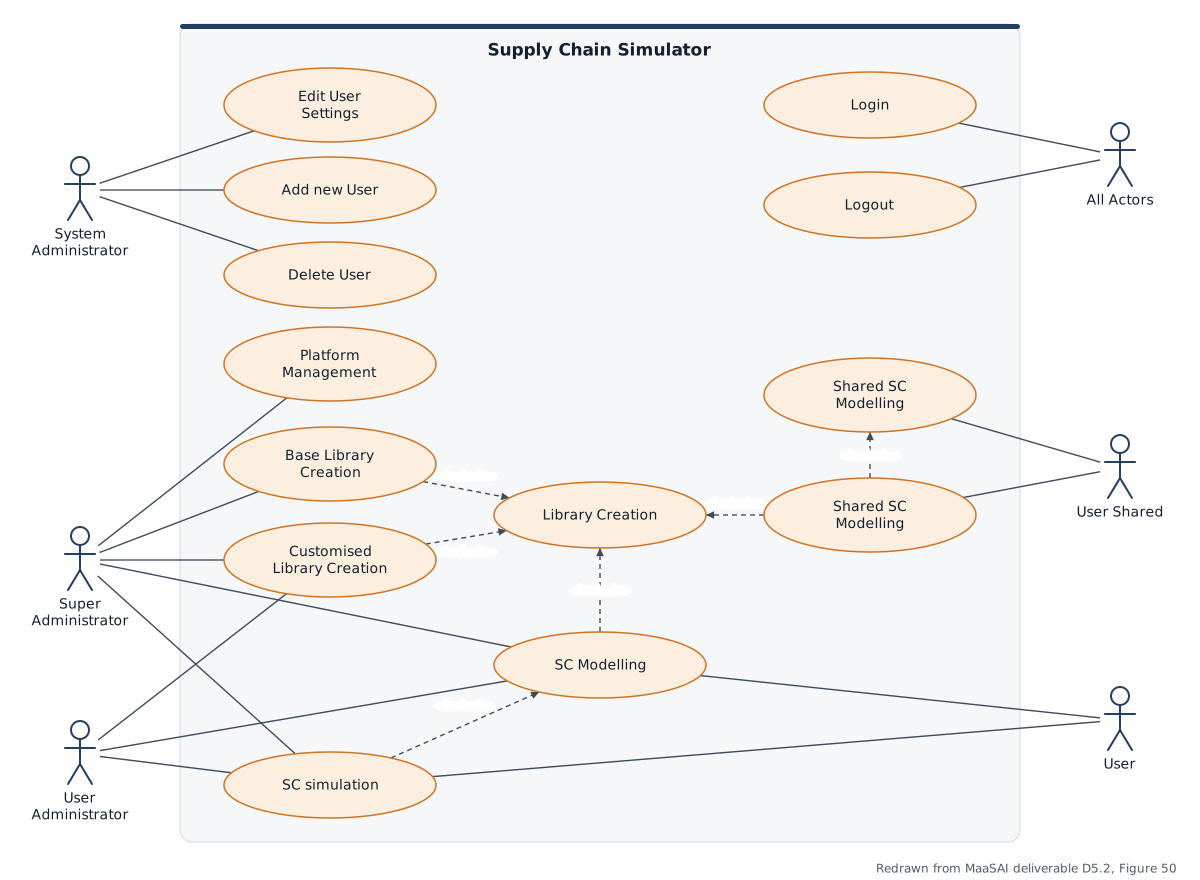
Use-case diagram redrawn from MaaSAI deliverable D5.2.
Functional Components
Section titled “Functional Components”SCS brings together data import, supply-chain modelling, simulation setup, simulation execution, and result export capabilities. The functional view shows how source data is ingested, configured, simulated, and returned to users and external storage for scenario comparison.
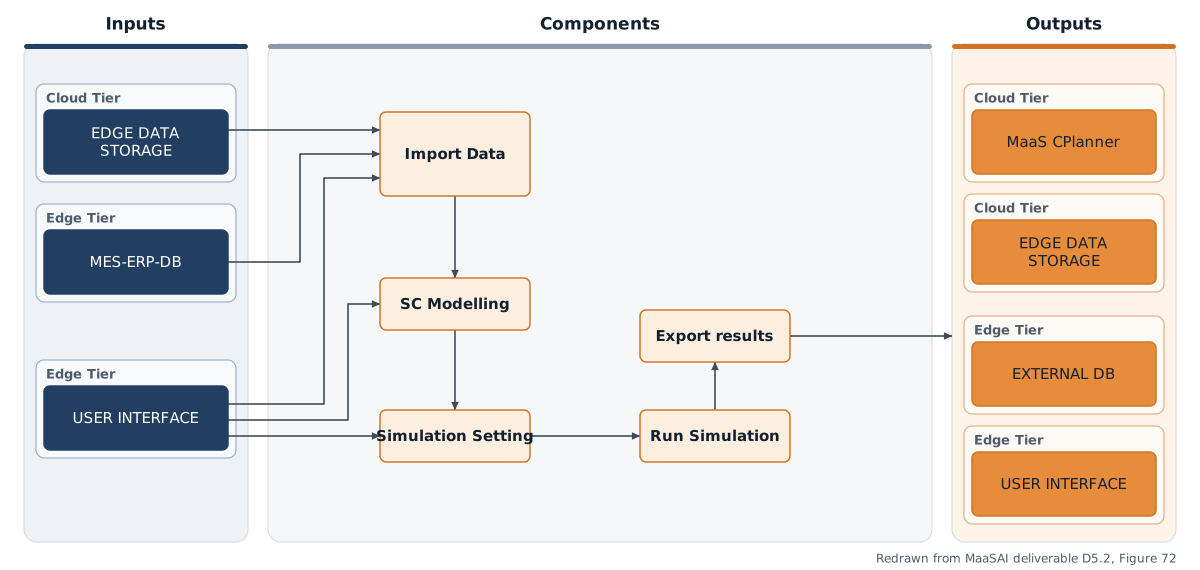
Functional components diagram redrawn from MaaSAI deliverable D5.2.
Design Baseline
Section titled “Design Baseline”The SCS is composed of two main components:
• Frontend: a user-friendly graphical interface that allows users to access functionalities according to their roles. Key features include guided workflows for building libraries and models, interactive Gantt charts for visualizing plans, and result dashboards for simulation outputs.
• Backend: responsible for managing business logic, task execution, access control, and API communication with the frontend and external components of the MaaSAI ecosystem.
This diagram meticulously illustrates the software architecture and the specific technologies employed to power the simulator. The entire system is accessible via a standard Web Browser and is deployed within a Docker container. The user interaction point is the Module User Interface which is built using React for its front-end logic and incorporates pyplot for Visualisation of the results. The UI directs the workflow by supplying Configuration data and Customization parameters to the downstream modules The processing sequence begins with the Data preprocessing and conditioning module which obtains its initial input from an external EDGE Data Storage/ DB Solution. This module leverages powerful Python libraries such as sklearn, matplotlib, and pandas to cleanse and prepare the incoming data.
The pre-processed data, labelled as Data static, json, csv, is then passed to the core of the system, the Run Time. This execution module is built upon the Framework /Flask and utilizes essential Python libraries to perform the calculations and simulations based on the Customization parameters received from the UI. The Run Time component also accesses a local instance of the EDGE Data Storage/ DBSolution for transactional data.
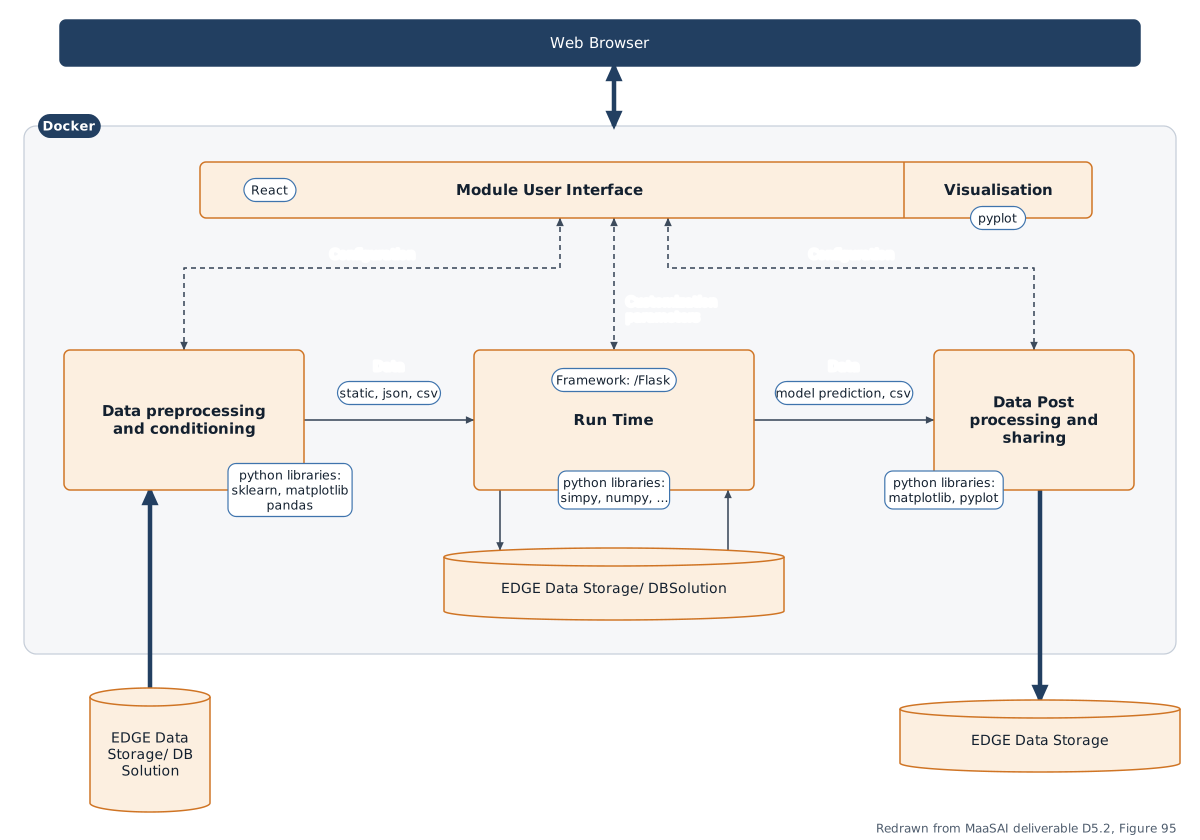
Architecture diagram redrawn from MaaSAI deliverable D5.2.
Technology Stack
Section titled “Technology Stack”The SCS is implemented as a web-based application composed of a React frontend and a Python backend.
| Category | Technology |
|---|---|
| Backend | Python (> 3.11) with Flask and Flask-CORS for the REST APIs; WebSocket (or similar) communication for real-time shared collaborative sessions. |
| Simulation | SimPy discrete-event simulation engine, executed through Python simulation scripts whose output is streamed live to the frontend. |
| Frontend | React web interface for library management, supply chain modelling, simulation configuration and shared collaboration. |
| Security | Keycloak authentication with role-based access control (SuperAdmin, UserAdmin, User, Shared User). |
| Containerisation | Docker, with Nginx as reverse proxy. |
Integrations & External Dependencies
Section titled “Integrations & External Dependencies”Within the MaaSAI ecosystem, the SCS is designed to interact with the MaaS Smart Planners on the consumer side, i.e. the MaaS Consumer Planner (MCP), providing feedback on logistics bottlenecks, transportation delays, warehouse utilisation and material flows that may influence scheduling strategies. A connection with the EDGE Data Storage (DS) is foreseen through the reporting/export functionality. Both integrations are planned rather than implemented in this release. The current release relies on a locally deployed Keycloak instance, with possible migration to the common MaaSAI Keycloak; Nginx and Docker are required for deployment.
APIs & Interfaces
Section titled “APIs & Interfaces”The backend exposes role-scoped REST API groups:
/api/libraries/*— library folders, customised libraries and reusable modelling components/api/dev/projects/*— SuperAdmin management of projects, versions, JSON blocks and Python files/api/projects/*/simulate/stream— simulation execution with real-time streaming of outputs and logs/api/user/projects/*— user-mode project access, imports, snapshots and simulation runs/api/useradmin/projects/*— pilot-level customised libraries, versioned projects and simulations/api/admin/users/*,/api/admin/user-groups— user, role and subgroup management via Keycloak/api/shared/projects/*— shared collaborative projects, metadata, access control and persistence
The React UI adapts to the user role: login and user management, shared project creation, base library creation, a supply chain modelling “debug” canvas, library version selection, and shared rooms for real-time collaborative modelling.
User Interface
Section titled “User Interface”Representative screens of the SCS web interface in the first release:
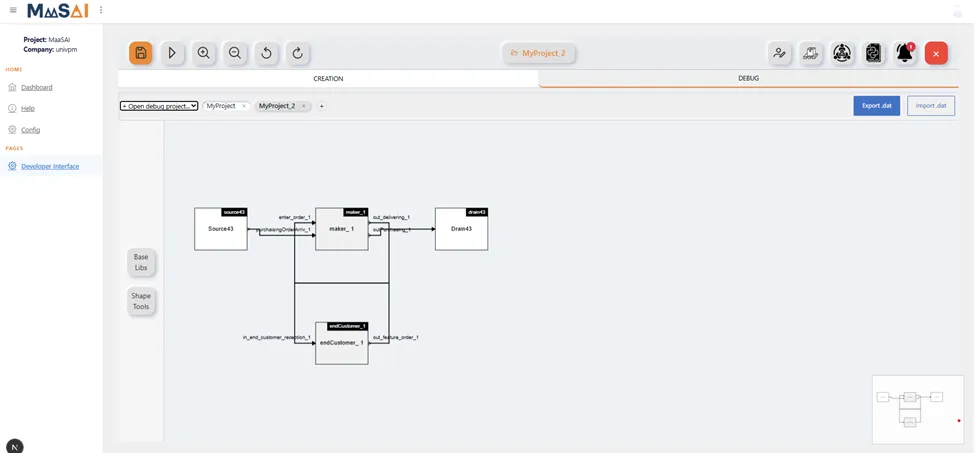
Supply chain modelling debug interface — MaaSAI deliverable D12.1.
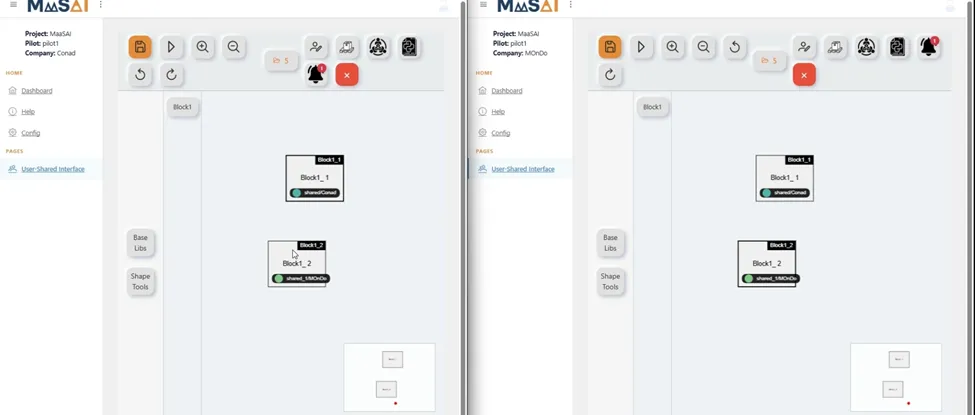
Shared User Mode visualisation — MaaSAI deliverable D12.1.
Deployment & Configuration
Section titled “Deployment & Configuration”The solution comprises the React frontend, the Python backend and a Keycloak authentication service, and can be containerised through Docker. In the current development configuration, project libraries and simulation files are stored in a local folder structure; for pilot deployment they should be moved to Docker volumes.
| Requirement | Minimum | Recommended |
|---|---|---|
| CPU | 1 vCPU | 4 vCPU |
| RAM | 4 GB | 8–16 GB |
| Storage | 10 GB | 20 GB |
| OS | 64-bit Linux | 64-bit Linux |