
MaaS Provider Planner (MPP)
At a Glance
Section titled “At a Glance”
- Category: Smart Planning & Operations
- Primary environment: MaaS Provider
- Documentation focus: Design reference
- Maturity: TRL 4, progressing towards TRL 5–6 (first release, reported in D12.1 at M20; MaaSAI System 1st Release planned for M24)
- Related architecture docs: Reference Architecture Guide, Environments
Purpose
Section titled “Purpose”The MaaS Provider Planner (MPP) is a cloud-based component that allows providers to manage and schedule requests coming from different consumers in order to optimise the use of shared resources according to provider priorities and constraints.
Primary Actors
Section titled “Primary Actors”The D5.2 usage viewpoint defines roles, permissions, constraints, a role-task matrix, and a use case diagram for this solution.
- User: Evaluate new orders coming from MaaS Consumers; constraint: Can view work-in-progress orders, resource status, KPIs, and other production-plan information after authentication via the Keycloak system.
- Admin: Configure resource availability, Manage users and roles (create, modify, deactivate) Create new configurations, new resources, etc.; constraint: Requires MFA for high privilege operations
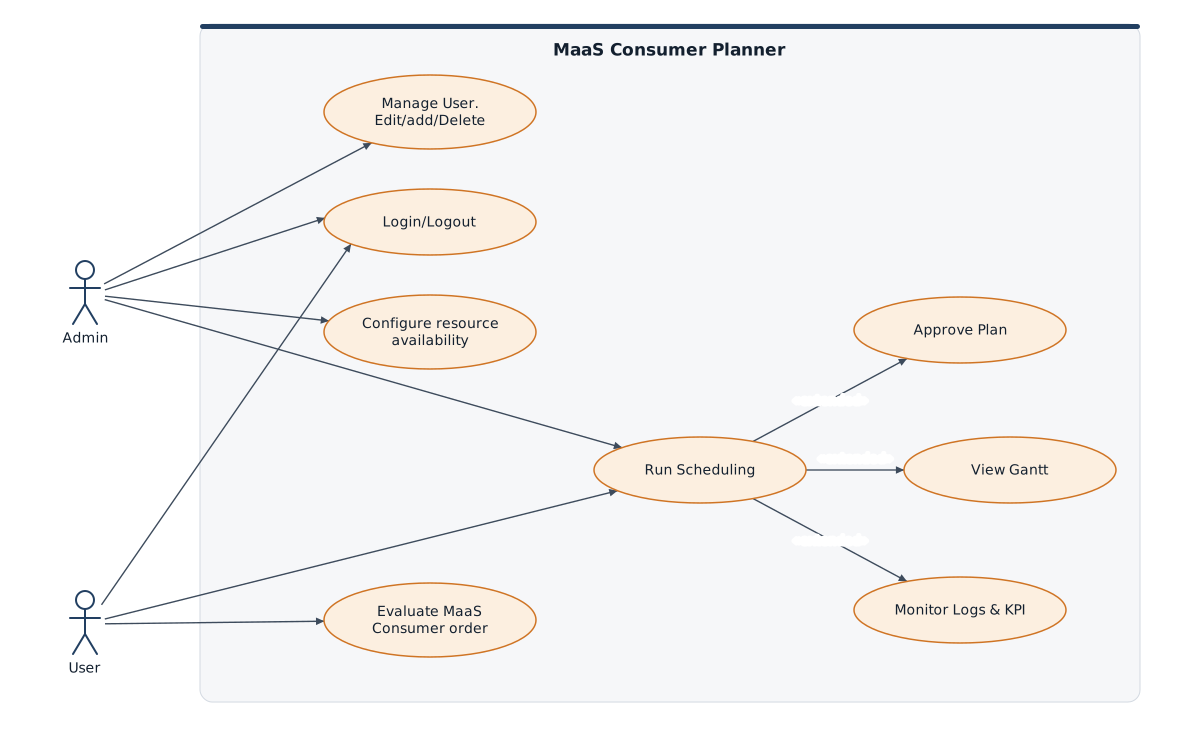
Use-case diagram, redrawn (this version is not included in MaaSAI deliverable D5.2).
Functional Components
Section titled “Functional Components”MPP combines provider-side planning, negotiation support, offer evaluation, and explainability capabilities to manage production commitments. The functional view highlights how planner inputs, marketplace exchanges, and smart-contract-related decisions are coordinated before a production offer is confirmed or revised.
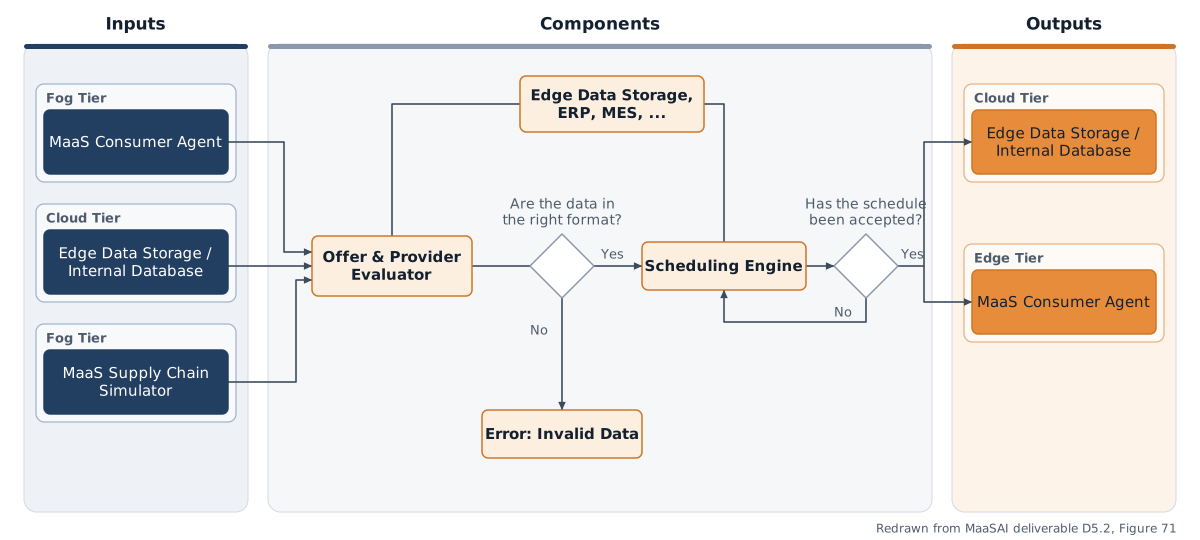
Functional components diagram redrawn from MaaSAI deliverable D5.2. D5.2 uses the same figure for the MaaS Consumer Planner (Figures 70 and 71).
Design Baseline
Section titled “Design Baseline”The tool will allow scheduling plans to be generated or existing plans to be rescheduled in a matter of minutes, thus enabling the user to be reactive and data-driven to disruptive events that may occur within a production site (changes in customer schedules, unforeseen machine breakdowns, lack of resources, etc.).
The MPP consists of two main components:
• Frontend: the graphical interface will be a tool allowing the provider to consult production plans via interactive Gantt charts, performance graphs and other production support tools.
The architecture shown in the Implementation Viewpoint illustrates the structure of the MPP and the connections between its main software modules and data storage systems. The system runs in a Docker environment and offers a web interface developed in React, with results displayed using pyplot. The heart of the application is the Flask framework, which manages data execution and processing using Python libraries such as sklearn, pandas, pytorch and gymnasium. Data from the EDGE Data Storage system is pre-processed, transformed into CSV or JSON files and passed to the prediction modules. The results are then post-processed, visualised and shared with the EDGE Data Storage and Provider Planner components to support planning decisions.
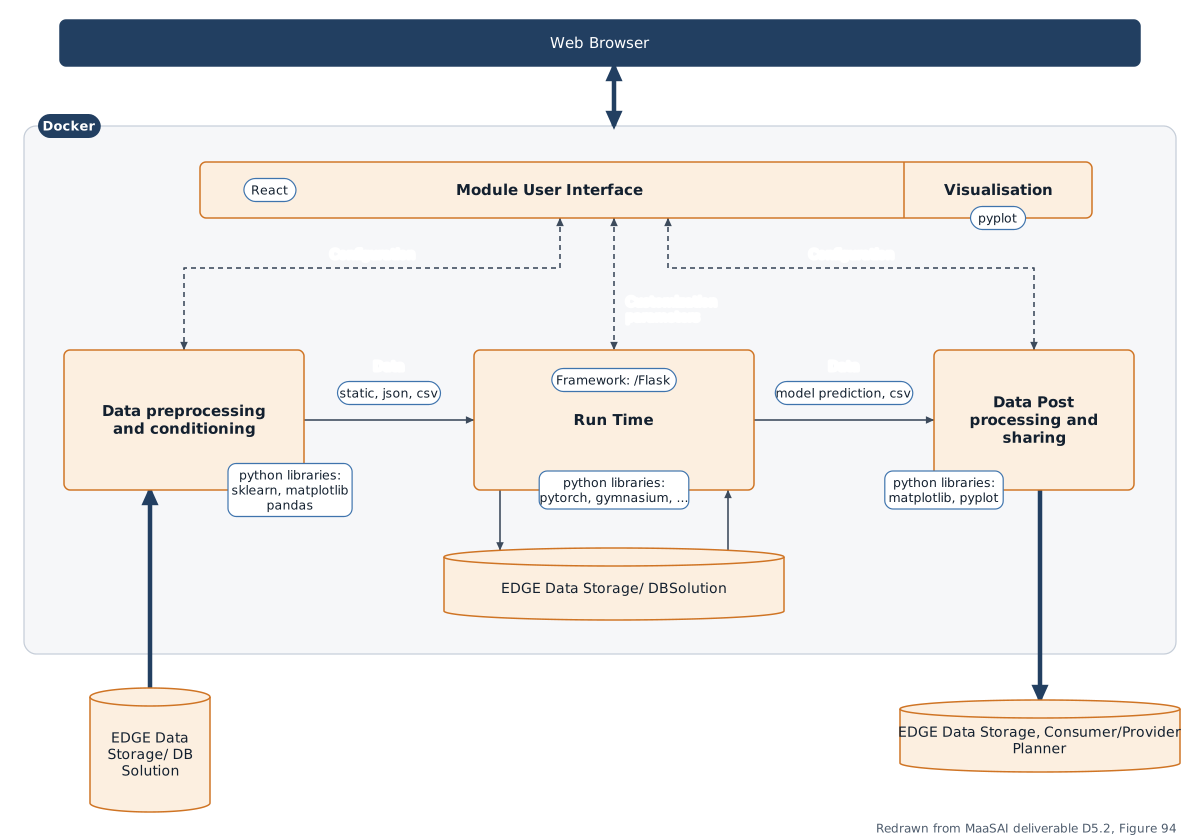
Architecture diagram redrawn from MaaSAI deliverable D5.2.
Technology Stack
Section titled “Technology Stack”The MPP is built entirely on open-source technologies and shares its architectural foundation with the MaaS Consumer Planner (MCP).
| Category | Technology |
|---|---|
| Backend | Python (> 3.9) with Flask and Flask-CORS for the REST API; NumPy and Pandas for data processing; Requests/HTTPX for communication with the PostgREST-based EDGE Data Storage. |
| Scheduling/AI | Ray, RLlib, PyTorch and Gymnasium power the Deep Reinforcement Learning scheduling engine (Proximal Policy Optimisation agent); Plotly generates JSON-serialisable charts for the frontend. |
| Frontend | React, based on the MaaSAI UI template provided by UPV. |
| Security | Keycloak authentication and access-control layer. |
| Containerisation | Docker, with separate frontend and backend containers orchestrated via Docker Compose. |
Integrations & External Dependencies
Section titled “Integrations & External Dependencies”The MPP reads scheduling inputs from and writes generated plans to the EDGE Data Storage (DS), following the ISA-95 standard. Bidirectional communication with the MaaS Provider Agent (MPA), which the planner will support during the negotiation phase with guidance on the feasibility of requests and production times, is defined for the second release. Runtime dependencies are Nginx (reverse proxy), Docker, and optionally the shared MaaSAI Keycloak instance.
APIs & Interfaces
Section titled “APIs & Interfaces”The Flask backend exposes a REST API consumed by the React frontend:
POST /api/scheduler/upload-plan— import an existing scheduling plan from JSONPOST /api/scheduler/load-from-edge— retrieve input data from EDGE Data StoragePOST /api/scheduler/run-engine— execute the scheduling engine and produce an updated planPOST /api/scheduler/save-to-edge— store generated results in EDGE Data StoragePOST /api/scheduler/save-plan-json— export the generated plan as JSON
The UI provides Keycloak login, JSON upload or DS connection setup, an editable schedule status table with KPI cards, workload and saturation charts per resource family, and interactive, downloadable Gantt charts.
User Interface
Section titled “User Interface”Representative screens of the MPP web interface in the first release:
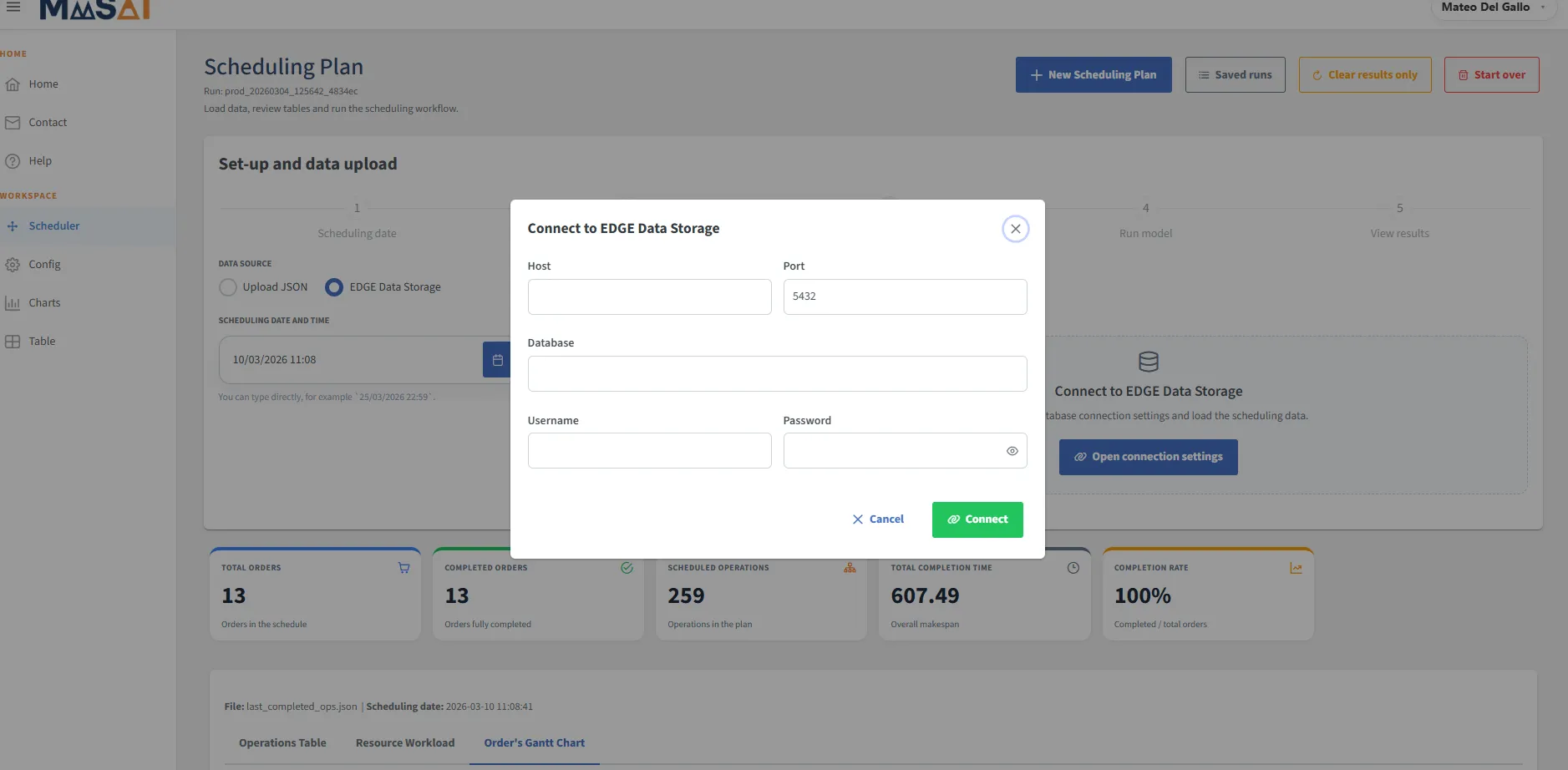
Connection interface with EDGE Data Storage for launching the planners — MaaSAI deliverable D12.1.
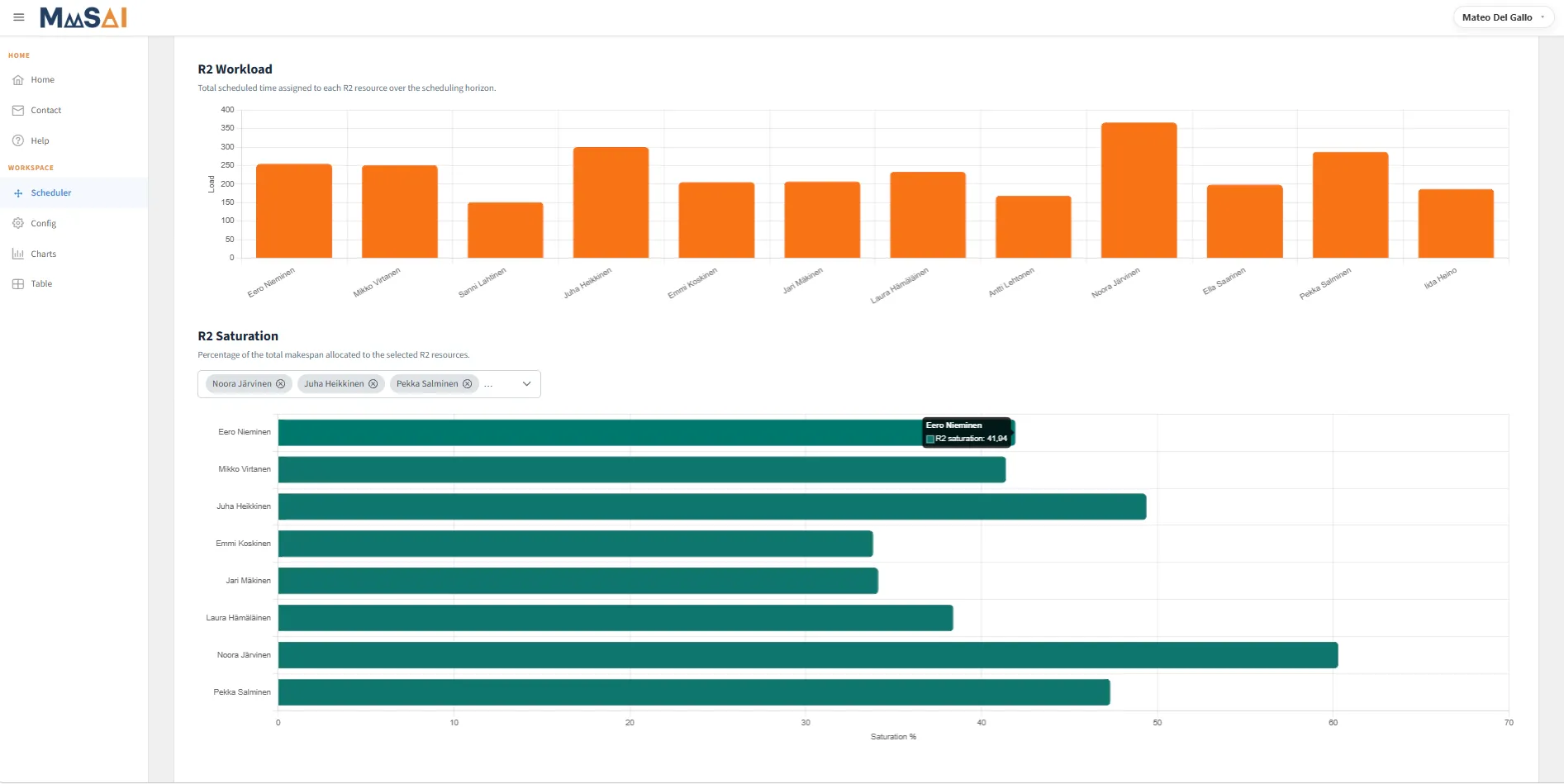
Viewing workload and saturation of resources — MaaSAI deliverable D12.1.
Deployment & Configuration
Section titled “Deployment & Configuration”The MPP is deployed as a Docker-based containerised application split into two services: a React frontend and a Python/Flask backend.
| Requirement | Minimum | Recommended |
|---|---|---|
| CPU | 1 vCPU | 4 vCPU |
| RAM | 4 GB | 8–16 GB |
| Storage | 10 GB | 20 GB |
| OS | 64-bit Linux | 64-bit Linux |
The DS connection is configured through host, port, database name, username and password parameters.