
MaaS Collaboration Hub (MCH)
At a Glance
Section titled “At a Glance”
- Category: Cloud & Marketplace Solutions
- Primary environment: Cloud MaaS Marketplace
- Documentation focus: Design reference
- Maturity: TRL 4, moving towards TRL 5–6 (first release, reported in D6.1 at M20; MaaSAI System 1st Release planned for M24)
- Related architecture docs: Reference Architecture Guide, Environments
Purpose
Section titled “Purpose”The MaaS Collaboration Hub (MCH) is a cloud-based component that facilitates seamless interaction between providers and consumers within the MaaS ecosystem. As part of the Cloud MaaS Marketplace and fully integrated into the MaaSAI system, the MCH enhances accessibility and streamlines secure messaging, task management, file sharing and virtual meetings. MCH is composed of several internal components to deliver its full range of functionalities.
Primary Actors
Section titled “Primary Actors”The D5.2 usage viewpoint defines roles, permissions, constraints, a role-task matrix, and a use case diagram for this solution.
- Admin: Responsible for creating organizations, creating MaaS Providers and MaaS Consumers and assigning MaaS Providers and MaaS Consumers to organizations
- MaaS Provider: Responsible for initiating and managing collaboration with MaaS consumers, including sharing all the necessary information and data.; constraint: Must be registered and authorized user; access is limited to assigned or shared workspaces only.
- MaaS Consumer: Responsible for participating in collaboration activities with MaaS Providers, including sharing all the necessary information and data; constraint: Must be registered and authorized user; access is limited to assigned or shared workspaces only
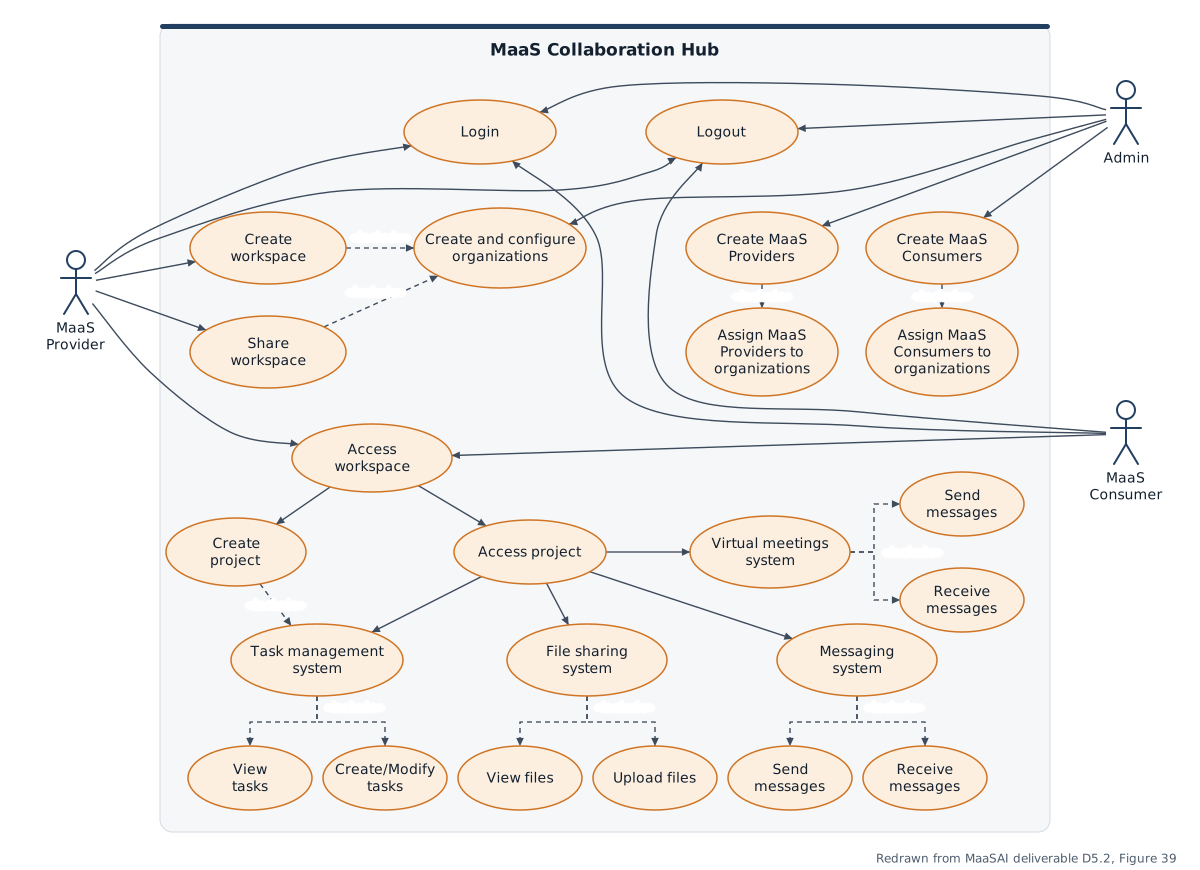
Use-case diagram redrawn from MaaSAI deliverable D5.2.
Functional Components
Section titled “Functional Components”MCH brings together workspace management, messaging, task coordination, file sharing, and meeting services behind one collaboration portal. The functional view highlights how user actions traverse the collaboration backend and storage services to keep project workspaces synchronized and secure.
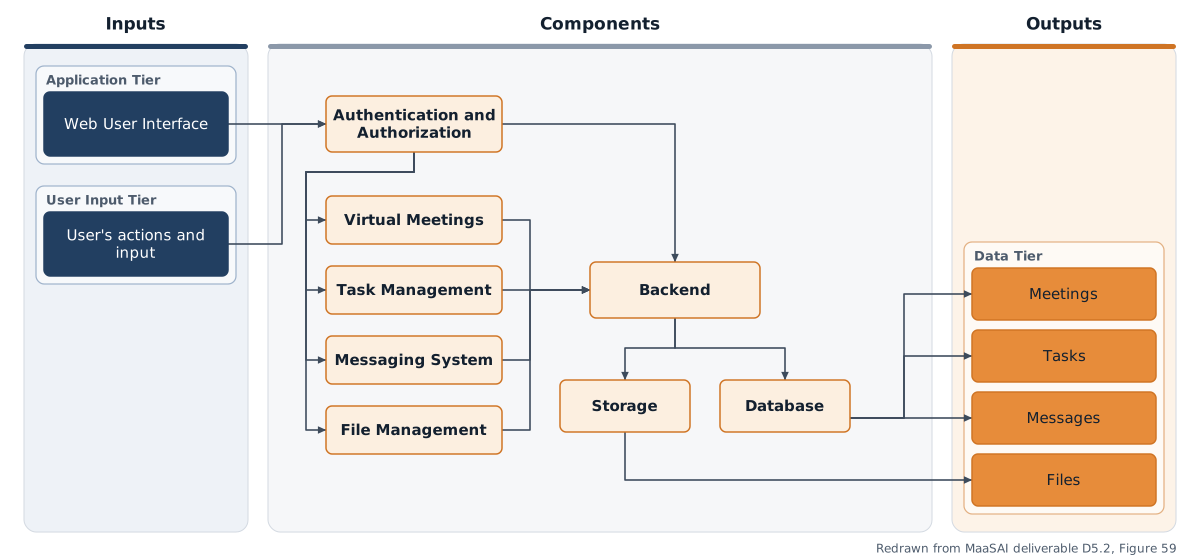
Functional components diagram redrawn from MaaSAI deliverable D5.2.
Design Baseline
Section titled “Design Baseline”• Frontend: The primary user interface of the MCH, offering a portal for users to access and interact with its features. It serves as the main point of engagement for both providers and consumers.
• Backend: Responsible for business logic, orchestration of services and communication among internal components. It manages all operations, event handling, feature execution and integration with external services.
• Storage: Manages the data of MCH, including user information and data from integrated external services. It ensures secure and reliable storage for all MCH internal components.
The system preliminary architecture is designed using a modular and containerized approach, ensuring scalability, maintainability, and ease of deployment. The key components interact through secure API calls.
• Frontend: The frontend application, hosted within its own Docker container, provides the user interface for all client interactions. It communicates exclusively with the backend through secure API calls. This separation allows for independent development and scaling of the user interface and server-side logic.
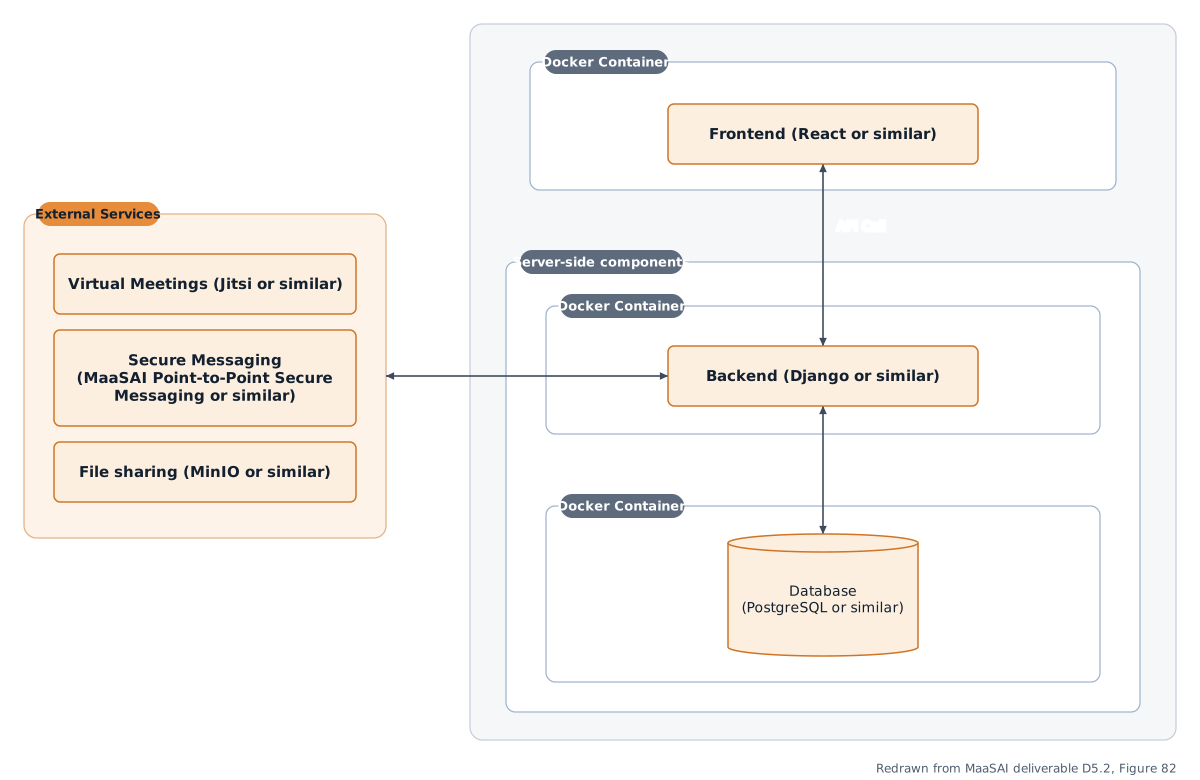
Architecture diagram redrawn from MaaSAI deliverable D5.2.
Technology Stack
Section titled “Technology Stack”MCH follows a client-server architecture with a decoupled frontend and backend connected via a RESTful JSON API, with real-time events delivered over a WebSocket channel.
| Category | Technology |
|---|---|
| Frontend | Vue 3, Vite, PrimeVue component library, state management via Pinia |
| Backend | Laravel 11 on PHP 8.2 (REST API, business logic, role enforcement, event broadcasting) |
| Data | PostgreSQL 16; MinIO (S3-compatible) object storage for file uploads |
| Identity | Keycloak 26 (authentication, JWT validation, role-based access control) |
| Real-time & meetings | Soketi (Pusher-compatible WebSocket server) with Laravel Echo; Jitsi Meet for video conferencing |
| Containerisation | Docker / Docker Compose |
Integrations & External Dependencies
Section titled “Integrations & External Dependencies”MCH sits at the operational layer, downstream of the Cloud MaaS Marketplace (CMM): when CMM processes a MaaS agreement, it will trigger the automatic provisioning of a workspace pre-populated with the relevant organisations and users. In this release the CMM order intake is partially implemented through a dedicated integration endpoint. Required external dependencies are PostgreSQL 16, Keycloak 26, MinIO, the Soketi WebSocket server, Jitsi Meet, and Docker/Docker Compose for deployment.
APIs & Interfaces
Section titled “APIs & Interfaces”The backend exposes a RESTful JSON API, complemented by real-time WebSocket events. Main endpoint groups:
- Health check, current user profile, and notifications (listing, unread count, mark as read)
- Organisations and users administration (admin role required)
- Workspaces and workspace members (admins see all workspaces; members only their own)
- Projects, tasks, messages, files and meetings, scoped at workspace and project level
- Contract summary per workspace
POST /api/integrations/cmm/orders— receives order notifications from CMM (service authentication required)
The Vue single-page application provides a dashboard, workspace and project views with tabs for projects, members, messages, files, meetings and contract info, a notifications page, and an admin area for organisations and users.
User Interface
Section titled “User Interface”Representative screens of the MCH web interface in the first release:
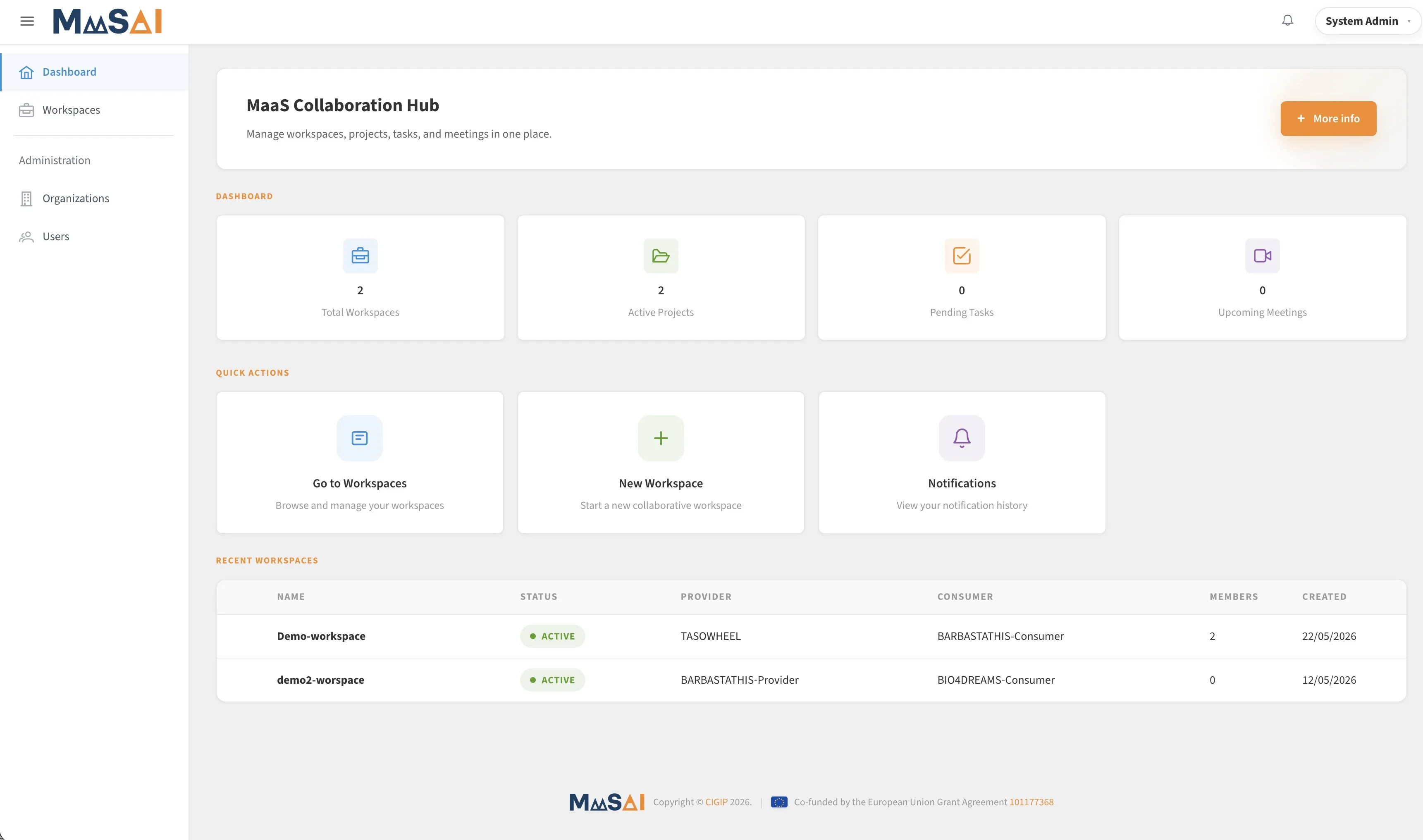
MCH dashboard (admin view) with platform summary statistics and quick actions — MaaSAI deliverable D6.1.
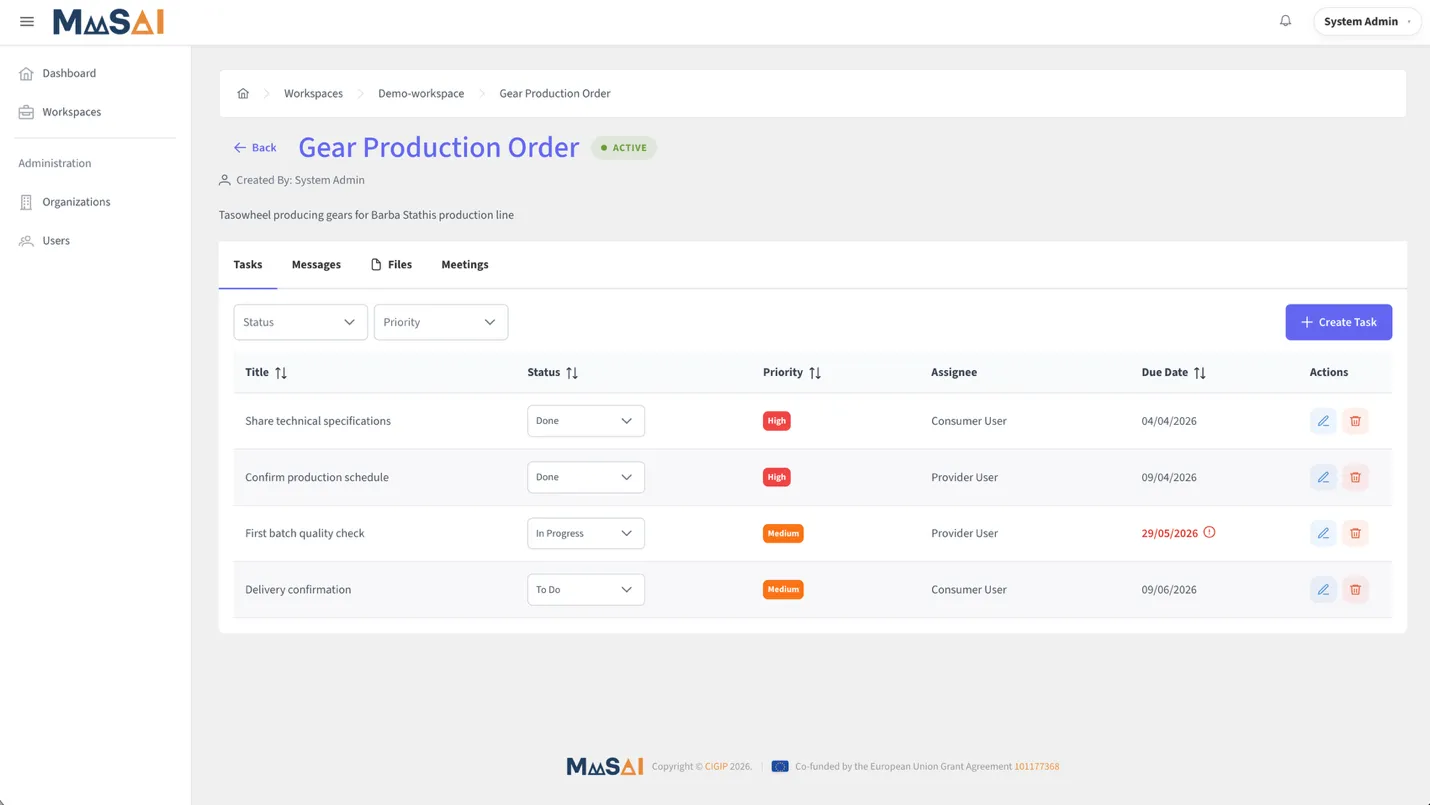
MCH project detail — tasks with status, priority, assignee, and due date — MaaSAI deliverable D6.1.
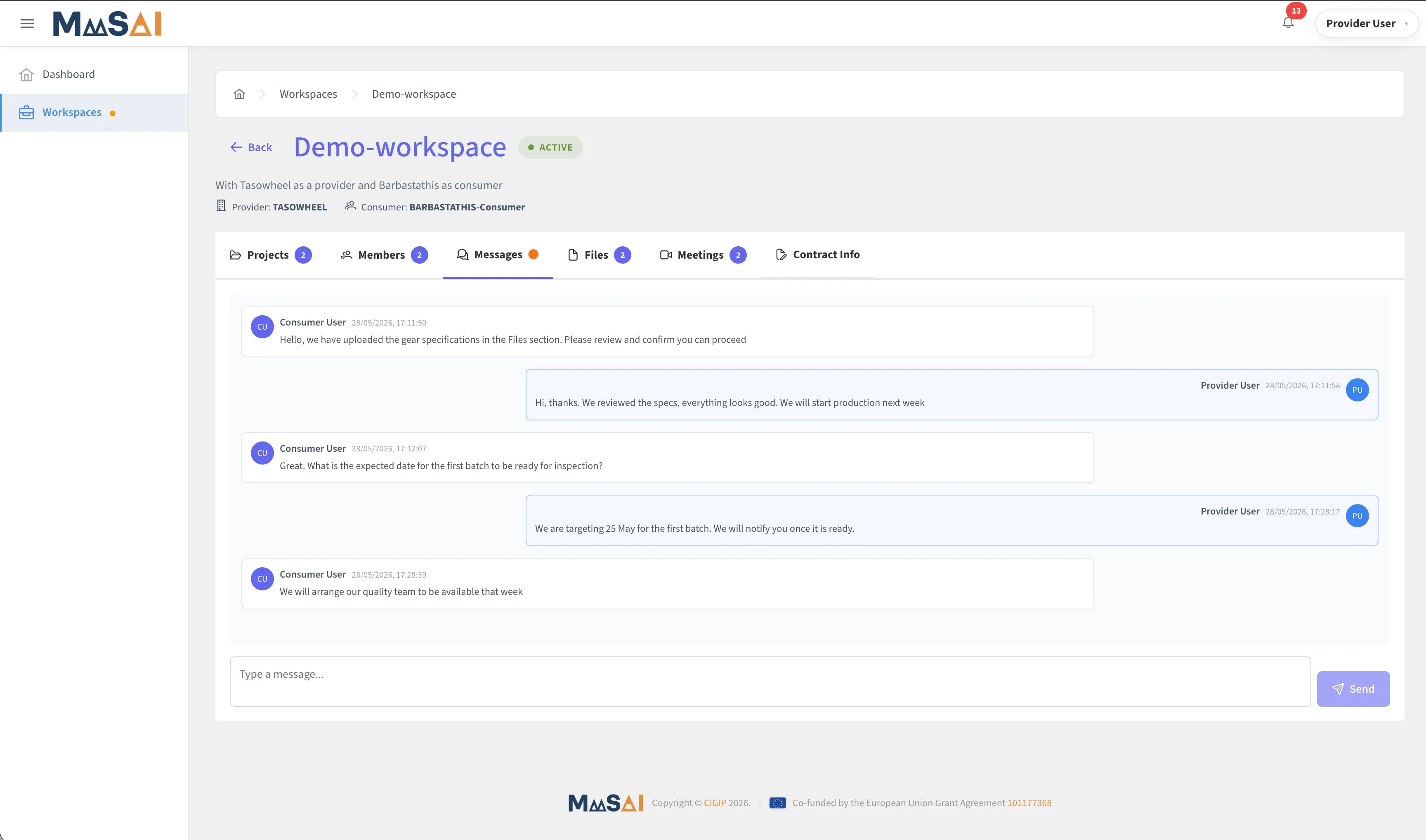
MCH workspace detail — real-time messages between Provider and Consumer — MaaSAI deliverable D6.1.
Deployment & Configuration
Section titled “Deployment & Configuration”All components — frontend, backend, database, identity provider, object storage and WebSocket server — run as Docker containers orchestrated by Docker Compose: the Vue SPA is served by Nginx, the Laravel backend runs under Supervisor, Keycloak uses a dedicated PostgreSQL instance, and MinIO initialises its bucket automatically on first run. Key environment variables configure database credentials, Keycloak realm and client settings, MinIO credentials and bucket name, Soketi application keys, and the Jitsi base URL; no sensitive values are embedded in code.
| Requirement | Minimum | Recommended |
|---|---|---|
| CPU | 2 cores | 4+ cores |
| RAM | 4 GB | 8 GB+ |
| Storage | 20 GB | 100 GB+ |
| OS | Linux | Linux |
A reverse proxy is recommended.